I can't open folders with double click anymore. Instead I have to right click and press open. How do I reenable it? I'm running Ubuntu 13.04.
Asked
Active
Viewed 3.2k times
10
-
OMG thank you so much for that i have been right clicking and hitting open for almost a year now – Jul 18 '14 at 07:12
5 Answers
22
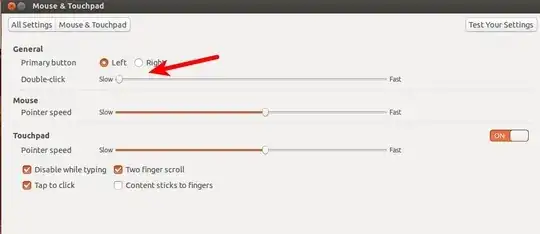
Go to System Settings > Click on Mouse and TouchPad & Check Double Click to low
Qasim
- 22,162
-
1I had been struggling without double clicking. thanks for your help and you made me work eagarly more on ubuntu – Kumaresan Perumal Jun 07 '16 at 06:48
10
Ubuntu 18.04
Open Settings and click on the left tap Universal Access.
In the bottom you will find Double-Click delay

abu_bua
- 11,333
-
I can confirm that this method of increasing double-click delay had solved my double-click problem – Cipto HD Nov 04 '18 at 16:54
1
In Ubuntu 17.10 and some other versions, the setting to set the double-click speed doesn't show under the "mouse and touchpad" settings - see here:

However, there is a different solution or workaround:
- Open the Activities overview and start typing Universal Access.
- Click on Universal Access to open the panel.
- Under Pointing & Clicking, adjust the Double-click slider to a value you find comfortable.
pomsky
- 70,797
user880540
- 11
-
If you have a new question, please ask it by clicking the Ask Question button. Include a link to this question if it helps provide context. - From Review – Daniele Santi Oct 10 '18 at 14:09
-
0
I was having this problem after reinstalling xserver sudo apt-get install xserver-xorg-input-all, since keyboard and mouse suddenly stopped working.
I tried the same with this answer: https://askubuntu.com/a/295342/1201991 . Everything was ok then.
AEM
- 1,154
-1
open startup Application Preference -> Add
- Name: Touchpad Tap Function
- Command : synclient TapButton1=1 TapButton2=3 TapButton3=2
Then click Add
And reboot