I am connected using SSH to a Ubuntu Box which is behind firewall and routers. From that Ubuntu box i need to open a router web page and login to the router for doing some changes.
How can i from command line open a web-browser which can allow me to do the similar web browsing in that LAN network?
I used lynx but its not helping me to do the main job. Anything else.
EDIT: using lynx i get this problem where i need javascript to have router web access.
<<<                                                                                                                                                   Linksys Smart Wi-Fi
JavaScript is required

   JavaScript is required to use Linksys Smart Wi-Fi Tools. Please change the security settings in your browser to enable JavaScript.


: q
  Arrow keys: Up and Down to move.  Right to follow a link; Left to go back.
 H)elp O)ptions P)rint G)o M)ain screen Q)uit /=search [delete]=history list
EDIT:
Step 1: remote laptop
$ ssh -ND 9009 sun@82.x.x.x
password: ......
Step 2: open firefox > do the settings like this:
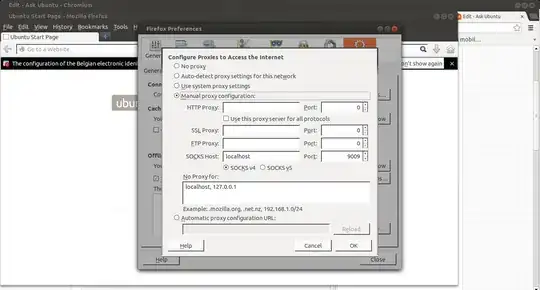
Step 3: go to site icanhazip.com and start surfing
it works.
AllowTcpForwarding noin its/etc/ssh/sshd_config. If that is the case, are there any other open ports to the SSH host? – Oli Jun 06 '13 at 11:59ssh -vvvvL 9009:192.168.0.1:80 sun@82.x.x.x– Jun 06 '13 at 12:02ssh -L 8080:ipofrouter:80 <host>method i can only browse the router nothing else, which is disturbing. – Jun 06 '13 at 12:03