When using Nautilus and right-clicking on a file > Properties, user is presented with a permissions tab. The default UI for this permissions tab is horribly difficult to understand and calibrate and lacks any sort of user-friendliness. Accordingly, I need Nautilus to display the alternate view: what has always been called "advanced-permissions" view. Here is what the "advanced-permissions" look like:
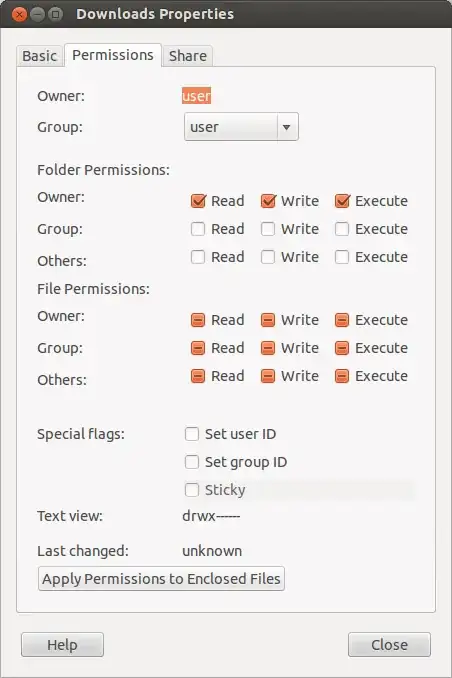
using dconf Editor I have always been able to go to setting dconf-editor > org > gnome > nautilus > preferences > show-advanced-permissions and change the appearance of the permissions to this "advanced" presentation which makes the permissions much easier to understand and calibrate.
So how do I get Nautilus to display what has always been called "show-advanced-permissions"? Why is this setting missing from 13.04? How do I get it back?