I can't believe I have to ask this...but, how do I change my account profile picture in Ubuntu 12.04 Desktop? One would think it would be under the "User Accounts" section.
Asked
Active
Viewed 1.5k times
3 Answers
13
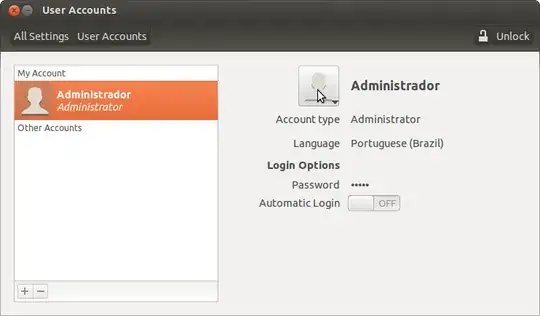
It is under System Settings -> User Accounts, look at the mouse pointer in this screenshot:
Eric Carvalho
- 55,573
-
Sheesh, how did I miss that? Thanks! – Clayton Dukes Jun 19 '13 at 13:19
3
Go to settings, User Accounts, and click "Unlock" on the top right, then choose the account you wish to modify. Then, click the current avatar and choose another one.
Farid
- 728
1
Ubuntu 18.04
"Settings" -> "details" (scroll to the bottom) -> "users".
or just from the menu (where is the power button), click on your username -> "Account Settings".
Marco D.G.
- 203