I recently received a Logitech Rumblepad 2 (a joystick, like a PS2 controller) from a friend.
How would I configure this in Ubuntu? If possible, I would prefer to use a GUI utility.
I tried jstest-gui, but it shows my accelerometer!
I recently received a Logitech Rumblepad 2 (a joystick, like a PS2 controller) from a friend.
How would I configure this in Ubuntu? If possible, I would prefer to use a GUI utility.
I tried jstest-gui, but it shows my accelerometer!
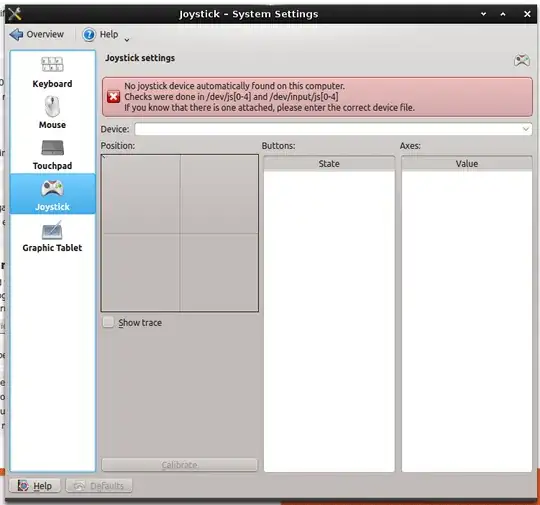
It is possible to calibrate Joysticks in Kubuntu using KDE's system settings. This is a bit of an "overkill" solution, as of course it requires KDE (and most Ubuntu users will not want this).
I did not have my joystick plugged in for the above screenshot, but I have tried it before and it works.
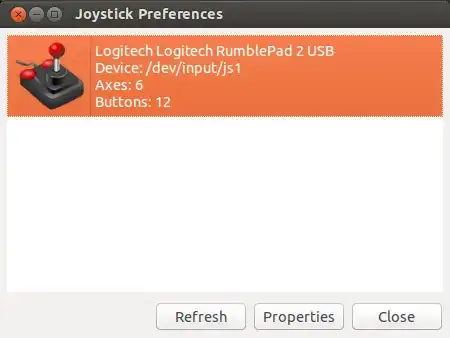
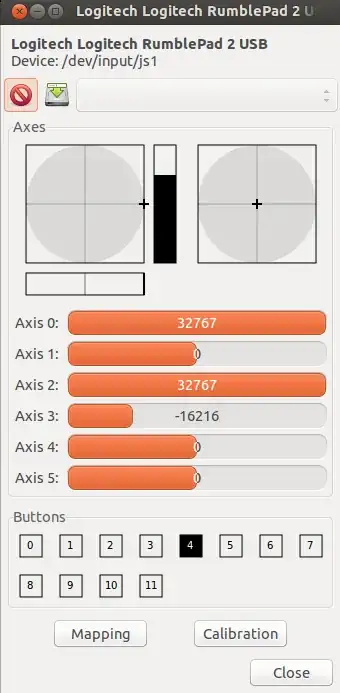
These are two tools included in the Ubuntu repositories that I have not tested recently (I found these when looking for other options). The first of the two, jstest-gtk, is a graphical tool, and joystick is a set of commandline utilities.
You can install them using:
sudo apt-get install jstest-gtk
or
sudo apt-get install joystick
Jstest-gtk is a front end to joystick's commandline tools.
kde-system-settings but can't find these settings. Where exactly are they? Do I need to install another package?
– Seth
Mar 19 '13 at 23:31
jstest-gtk but it doesn't seem to allow me to change anything.. useful for testing though.
– Seth
Mar 19 '13 at 23:54
Not tested by me, but found in a link provided at: http://ubuntuforums.org/showthread.php?t=393425, I hope this may help.
Install joystick and jscalbrator
sudo apt install joystick jscalibratorthen run the calibration processes
jscal -c /dev/input/js0(this is my joystick location, check yours)
jstest /dev/input/js0(or wherever) If I remember correctly, this should return 0 for no error.run jscalibrator
jscalibratorand it should recognize the type of gamepad correctly and recognize all of your buttons, and axis
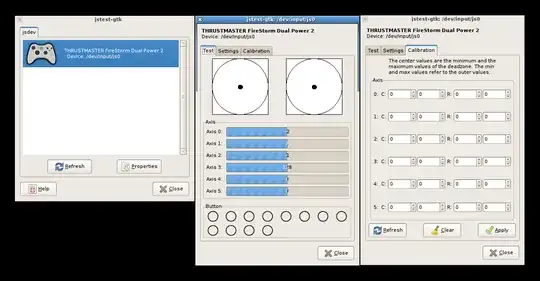
There is also an application called jstest-gtk, which seems to do something like that, I post here a screenshot and the link for you: https://github.com/Grumbel/jstest-gtk (This software may need to be compiled in order to make it work)
I'm using Ubuntu 13.04 and have Logitech Rumblepad 2. And what I did was installing these, joystick and jstest-gtk. It's already been calibrate to default and joystick device is detected right. Just plug and play.
If you need to calibrate and save your configuration you can do this, open jtest-gtk, You will see this,
You can calibrate by double click on the device.
Hope it will help you out as it has done to me.
Thanks to @B. du Garay for pointing out in comments that anti-micro is now available in the repository (20.04 only), install it with:
sudo apt install antimicro
The answers here are getting a bit old now, and users seem to be having issues again, so this is a 2016 solution to configuring your joystick or gamepad on Ubuntu.
You can use antimicro, it is a fork of joy2key and has a GUI, use this PPA for 12.04 to 15.10
sudo add-apt-repository ppa:ryochan7/antimicro
sudo apt-get update
sudo apt-get install antimicro
For 16.04+ use this PPA
sudo add-apt-repository ppa:nilarimogard/webupd8
sudo apt-get update
sudo apt-get install antimicro
droidpad application which allows android phone to be used as gamepad.
– vivi
Apr 16 '16 at 17:56
sudo apt-get dist-upgrade try installing the xbox driver sudo apt-get install xboxdrv reboot after each one. I also updated the answer to include a version for 16.04 if you want to upgrade. @TenLeftFingers
– Mark Kirby
May 06 '16 at 16:42
ftest /dev/input/by-id/..
– n1k31t4
Oct 25 '17 at 10:25
I am currently using qjoypad for mapping keys (even the mouse) to a Logitech Gamepad F310. It's working well for games that are designed with only keyboard and mouse controls in mind. It seems to require being run from cli as qjoypad --notray. It does use a GUI.
How to Install Qjoypad
First add the GetDeb Games ppa
wget -q -O - http://archive.getdeb.net/getdeb-archive.key | sudo apt-key add -
sudo sh -c 'echo "deb http://archive.getdeb.net/ubuntu raring-getdeb games" >> /etc/apt/sources.list.d/getdeb.list'
Then update and install package
sudo apt-get update
sudo apt-get install qjoypad
Alternatively download the package here and install with your favorite package manager.
Decompress the tar.gz and the installation should be as simple as
`./config`
`make`
`make install`I created a tool to calibrate my joysticks: https://github.com/dkosmari/calibrate-joystick
Calibration steps:
If your desktop environment can auto-launch apps, you can auto-launch the "(daemon)" version. It will monitor joysticks when they get plugged in, and either apply the saved calibration, or display the calibration window.
Note that the calibration is applied to the kernel's evdev driver. All parameters (except for fuzz) are merely suggestions for games to obey.


- no longer available,
- bugged
- won't be fixed Ref: https://bugs.launchpad.net/ubuntu/+s...sw/+bug/416628 Looking for an alternative
– Jan 20 '12 at 09:42