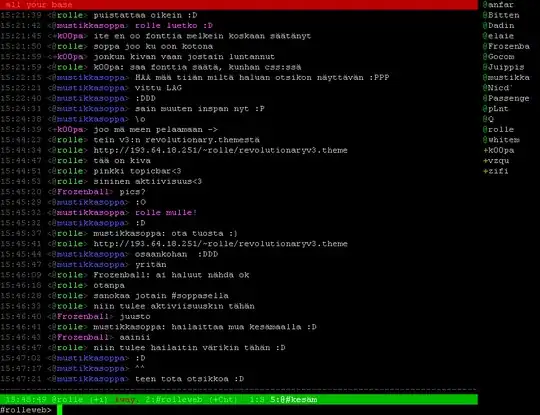
Alright, I have been reading the documentation I don't know if I missed it but how can I put the channel list (the people in the channel) to the right side like this theme here
Asked
Active
Viewed 2,914 times
2 Answers
3
Search for nicklist.pl on http://scripts.irssi.org/.
EDIT: this is some help about its use: http://wouter.coekaerts.be/site/irssi/nicklist
enzotib
- 96,253
0
In addition to 'enzotibs' correct answer some more detailed information:
- Download the nicklist.pl script directly here, or use scripts.irssi.org.
- Now you can put the downloaded
nicklist.plscript into~/.irssi/scripts/. - Make an alias of nicklist.pl and put the alias into
~/.irssi/scripts/autorun, then change its name to nicklist.pl again. Now open a terminal window and download screen:
sudo apt-get update
sudo apt-get install screenNow open another terminal window and type:
screen irssi
/nicklist screen
/server servername.blah
/join #channelNow you should have exactly what you asked for!
Some more information on how to handle .pl scripts in irssi:
Q: How do I run scripts?
A: Put them into ~/.irssi/scripts/ and in irssi do /script load script.pl. There is a default alias for /script load to /run in newer versions of irssi.
Q: How do I rerun scripts?
A: Just do /script load script.pl
Q: How do I unload scripts?
A: Just do /script unload script.pl
Q: How do I run scripts automatically at startup?
A: Put them into ~/.irssi/scripts/autorun/ directory. Or better would be if you placed them in ~/.irssi/scripts/ and created symlinks to autorun directory (eg. cd ~/.irssi/scripts/autorun/ ; ln -s ../script.pl)
Q: Is there an easy way of managing script?
A: Try scriptassist.pl, it can update and manage your scripts as well as install new ones and search the database.
v2r
- 9,707