I have to start by saying that I have just switched to Ubuntu from Windows and I am new to Linux in general. Coming from Windows, I really am not familiar with how exactly the permissions work, the Linux file system, where I am able to create folders that I can use without the sudo command etc.
I use eclipse on a daily basis for android development and other simple java swing projects. I was able to download and extract the latest available version of eclipse (kepler) to this path: /opt/eclipse. Inside this directory is the eclipse executable and other eclipse related files.
I also installed the JDK and verified with the java -version command. It says:
java version "1.7.0_25"
Java(TM) SE Runtime Environment (build 1.7.0_25-b15)
Java HotSpot(TM) 64-Bit Server VM (build 23.25-b01, mixed mode)
I am running on a 64 bit CPU architecture so both programs are the 64 bit version.
Now, my problem is that if I open eclipse from the Unity dash or from the file explorer, it give me this error:
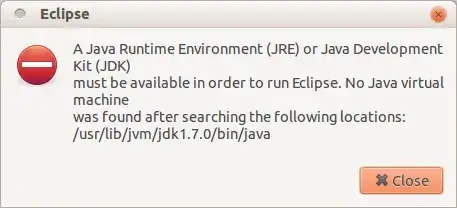
However if I run sudo eclipse in the terminal, everything runs just fine as long as I do it as the super user. I have a hunch that the JDK is installed in a folder that is restricted to normal users and only works if I run the sudo command but this is just a hunch. As I said, I am new to Linux and I am not really sure what I am doing wrong here, I am learning as I go. I need a good explanation as to how to make it start from the Unity dock without the sudo command. Thanks in advance!