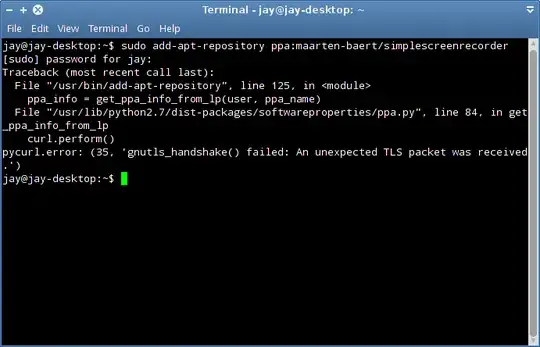
Every time I try to add a ppa I get this error message. I have tried with about a dozen PPA's
EDIT: UbuntuStudio 12.04
Asked
Active
Viewed 1.4k times
2
user197088
- 353
-
https://bugs.launchpad.net/ubuntu/+source/pycurl/+bug/926548 – Oli Oct 09 '13 at 08:41
-
Which Ubuntu release are you running? – Mitch Oct 09 '13 at 08:48
-
Sorry, UbuntuStuio 12.04. Just added to OP – user197088 Oct 09 '13 at 14:04
-
1http://askubuntu.com/questions/110672/add-apt-repository-returns-unexpected-length-error – Rinzwind Oct 09 '13 at 14:07
-
using a proxy? ;-) – Rinzwind Oct 09 '13 at 14:08
-
Yes, free wifi from where I live uses proxy authentication. – user197088 Oct 09 '13 at 17:53
-
That's a shame if it's the wifi. I'd hate to go back to windows just because I can't install software :( – user197088 Oct 09 '13 at 18:09
2 Answers
4
FINALLY SOLVED! There are several steps to get it working but it is well worth it in the end. As a bonus I learned a bit more about linux fixing it myself instead of relying on a GUI for everything. Because I was having the exact same problem with different distros (I tried Mint 15 cinnamon, UbuntuStudio 12.04, UbuntuStudio 13.04, and finally Ubuntu 12.04) I figured it was a problem with my internet. A comment above confirmed this. My internet is free wifi from where I live. It is behind an authenticated proxy. The problem seems to be directly related to the proxy internet I am receiving. When trying to add a PPA through the terminal I would get this error:
Traceback (most recent call last):
  File "/usr/bin/add-apt-repository", line 125, in <module>
    ppa_info = get_ppa_info_from_lp(user, ppa_name)
  File "/usr/lib/python2.7/dist-packages/softwareproperties/ppa.py", line 84, in get_ppa_info_from_lp
    curl.perform()
pycurl.error: (35, 'gnutls_handshake() failed: An unexpected TLS packet was received.')
The solution is to manually add the PPAs to your sources list. Use the following command to open the sources list:
sudo gedit /etc/apt/sources.list
Add your PPAs at the bottom using the following structure:
ppa:<user>/<repo>
deb http://ppa.launchpad.net/<user>/<repo>/ubuntu precise main
If my ppa is:
ppa:sunab/kdenlive-release
Then I need to add the following deb line to the bottom of the file. Note that I added a line above it as reference to the line below:
#for kdenlive 9.6
deb http://ppa.launchpad.net/sunab/kdenlive-release/ubuntu precise main
Save and close. Follow that with
sudo apt-get update
This will probably return an error regarding untrusted packages. You should see something with NO_PUBKEY and a string of numbers/letters such as B5115B98AA836CA8. Only this string of numbers/letters is needed. Copy and paste the following command in a terminal but replace the XXXXXX with your string of numbers/letters.
sudo apt-key adv --keyserver keyserver.ubuntu.com --recv-keys XXXXXX
Follow that with:
sudo apt-get update
sudo apt-get install WHATEVER-YOU-ARE-TRYING-TO-INSTALL
I spent 3 days surfing the internet to get this to work. I was extremely close to going back to windows. I hope this will be able to help someone else who was having the same problem.
user197088
- 353
-
I was stuck at this command for a while:
sudo apt-key adv --keyserver keyserver.ubuntu.com --recv-keys XXXXXXWhen I replaced it with this one, it finally worked (changed the URL, not sure if the -E option affected it as well):
– michalstanko Jul 08 '15 at 08:31sudo -E apt-key adv --keyserver hkp://keyserver.ubuntu.com:80 --recv-keys XXXXXX
1
Just stumble upon the same issue , and I used another work around :
- first of all ,
sudo su - then: export
http_proxy="your.proxy.here"ANDexport https_proxy="your.proxy.here"
Then, run add-apt-repository xxxxxxxxx and it works.
The idea came to me after struggling before with installing something using python's PIP :)
Hope it helps.
Eric Carvalho
- 55,573
eemerge
- 11