3

I had an older laptop with ubuntu 13.04 (upgraded a few times) where I've installed xmonad. In xmonad I would get all the media keys bindings from ubuntu (including osd notifications). I'm not sure what it was, but perhaps it was gnome-settings-daemon that was taking care of it because there are entries in dconf for that.

In my new laptop I installed Xfce through a minimal iso, then compiled Xmonad. I tried to keep the same environment -- gnome-settings-daemon is run in .xinitrc as before and gsettings contains the same bindings. However, the key bindings do not work. What am I missing? I guess I could try to install the whole ubuntu-desktop but I have a small SSD so I'd like to avoid that.

I know Xmonad can define its own custom handlers, but I'm having trouble with defining volume control actions and I figured it would be easier to just use what's out there already.

tl;dr

What executables/packages/config entries are necessary to get ubuntu/gnome keybindings work in another window manager? Can I get them to work without pulling in the whole ubuntu-desktop? I am running gnome-settings-daemon + the media-keys plugin is active in dconf, but the keys are not handled.
2 Answers2

4

It looks like GNOME removed the media key handling from gnome-settings-daemon and integrated it into gnome-shell:

https://bbs.archlinux.org/viewtopic.php?pid=1262789

I'm still looking for a good solution. Arch/Cinnamon people have apparently forked the 3.6 version.

  • Any news on this? This is still broken and there is no way to fix this on ubuntu without using unity?? – simao Nov 18 '13 at 09:23
1

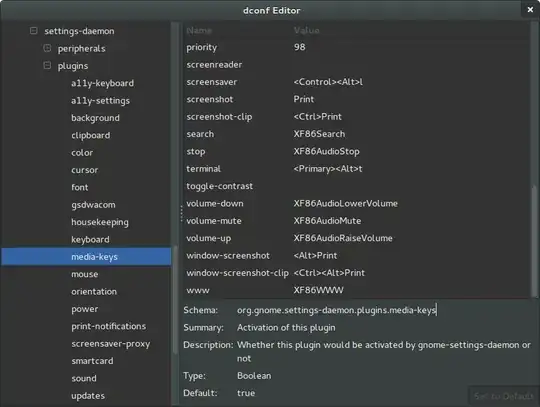
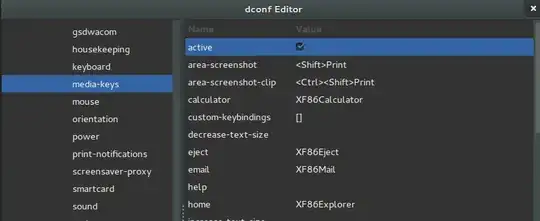
If you want to use dconf instead of xmonad controls, you should disable xmonad plugin (since it could cause interference) and then go down to the following path using the dconf-editor:

 org.gnome.settings-daemon.plugins.media-keys

Here there are all the keys you need to configure your media actions. You should mark it as active in the first key so it works.

enter image description here

enter image description here

Braiam
  • 69,302
  • that's not an answer to my question. I know how to bind keys in xmonad, and I know how to edit gconf/dconf stuff. To be specific, Xmonad-extras has a volume module that seems to have a bug -- toggleMuting is able to mute the audio but does not restore it. That's why I was trying to get ubuntu/gnome to handle the media keys like on my previous laptop. – BruceBerry Oct 10 '13 at 19:24
  • 1
    @BruceBerry can you rephrase the question then and specify what you don't know? As I know what keys should be modified to make dconf use the volumes. – Braiam Oct 10 '13 at 19:28
  • I don't know why ubuntu/gnome keys bindings are not active in my Xsession-Xmonad despite having them in dconf and running gnome-settings-daemon. I guess I am missing some other package from ubuntu-desktop? – BruceBerry Oct 10 '13 at 19:32
  • 1
    @BruceBerry ok, but please, edit your question and include that, since the 3 paragraphs are just about xmonad. Also I believe that right now it should answer your question. – Braiam Oct 10 '13 at 19:38
  • my problem is that despite these conf entries being there already, it still doesn't work. I've updated the question with a final paragraph. – BruceBerry Oct 10 '13 at 19:58
  • @BruceBerry you sure the first key is set to true? Check the last image. Also a logout may be required. – Braiam Oct 10 '13 at 20:09
  • i'm positive. btw, i also run gnome-settings-daemon in debug mode and when pressing the media keys no message was displayed. – BruceBerry Oct 10 '13 at 20:58
  • Mmm... then something is definitively wrong. Try with other user then. – Braiam Oct 10 '13 at 21:25