I want to play games on the vice emulator on Ubuntu 14.04. I have never managed to get vice working in Ubuntu. What are the steps needed to achieve this?
Asked
Active
Viewed 3.3k times
17
-
What's Vice C64? – Braiam Oct 12 '13 at 22:16
-
It's a commodore 64 emulator. There is a a linux version but I don't know how to get it working. I have now discovered you can sudo apt-get install wine and then download the windows version and use it with wine – uzi3k Oct 13 '13 at 22:43
-
See this for an update: https://askubuntu.com/a/1062151/29097 and improved method – Evan Carroll Aug 03 '18 at 22:00
4 Answers
16
update --- there is a new release now, 3.3, and as 3.2, works great.
I managed to compile it with trial-and-errors adding the following libraries:
sudo apt install xa65 libreadline-dev libxaw7-dev libgtkmm-3.0-dev libpulse-dev
and compiled with
./configure
make
sudo make install
...and it seems to work (the lib hack is not needed anymore). Seems a quite live project!
Original content:
You can compile the native version pretty easily (well...). Tested with version 2.4. (compact instructions --- tell me if you need more details).
1) download the last version from http://vice-emu.sourceforge.net/
2) unpack it where you want
tar xvzf vice-3.1.tar.gz
cd vice-3.1
3) install required dev libraries:
sudo apt install build-essential libvte-dev libasound2-dev libgtk2.0-dev libgnome2-dev byacc flex
4) configure, compile and install (it will go in /usr/local/). On my netbook, I have a coffee after the "make"...
./configure --enable-gnomeui
make
sudo make install
5) if you machine is 64 bit, do the following (as root)
cd /usr/local/lib
sudo ln -s ../lib64/vice .
(this is probably a bug; the emulator will search the ROMS in /usr/local/lib even if the installation is a 64 bit one and the install program will put the libraries under /usr/local/lib64/)
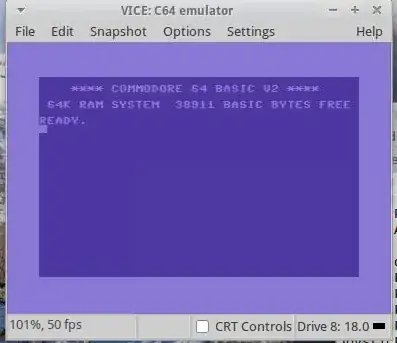
6) type x64 and Enjoy! (this thing evokes a tear... my first computer ever was a C64. If only I did not lose my discs...)
Rmano
- 32,217
-
thanks @Rmano, now I can finally play mission impossible on ubuntu. just a quick question: is it possible to set fullscreen mode? I can't find how to do it. – tezzo Mar 07 '14 at 07:56
-
Fullscreen does not work for me either. It produce a borderless window, but does not scale to fit the monitor. I think is by design; really the emulator maps 4 (2x2) real pixels to each pixel of the C64. But you can ask the upstream forums... – Rmano Mar 07 '14 at 15:54
-
1This still works with Ubuntu 14.04, playing last ninja and it works great, fullscreen doesn't work for me either. – uzi3k Sep 12 '14 at 21:42
-
1
-
-
1On Ubuntu 17.10 with vice-3.1 you need
sudo apt install byacc flexbefore youconfigure– rubo77 Nov 01 '17 at 20:44 -
2I like this emulator as it produces the sound of the 1541 Floppy Drive. Definitely a tear is shedding! =) Thank you! – Terrance Nov 16 '17 at 15:02
-
1
-
-
libgnome2-devis not found in Ubuntu 20.04, is this really needed? maybe build it from source then too? or get it from Debian stretch here, and here also needed then would belibbonobo2-0,libgnomevfs2-0, liborbit-2-0andlibgnome2-common` ? – rubo77 Aug 14 '20 at 10:05 -
@rubo77 I have no time to check here, but in https://vice-emu.sourceforge.io/NEWS it seems that the new version (3.4) is on Gtk3... so it's a matter of downloading and trying to compile. – Rmano Aug 14 '20 at 12:17
-
without
libgnome2-devI get the errorconfigure: error: invalid option: --enable-gnomeuion 20.04 – rubo77 Aug 14 '20 at 13:08 -
I used this:
apt install xa65 libglew-devand then./configure; make; make install. The command is nowx64scbut it seems to work correctly. I am on 18.04 still, can you check it on 20.04? @rubo77 – Rmano Aug 14 '20 at 15:40 -
I get an error
Makefile:1119: vice.txt] Fehler 127after some making time: https://pastebin.pl/view/bb725dd9 - I testedapt install xa65 libglew-devand then./configure; make– rubo77 Aug 15 '20 at 09:43 -
1Anyway: on Ubuntu 20.04 there is no need to compile, in the ap repositories is the latest version 3.4:
sudo apt-get install viceand then startx64sc. – rubo77 Aug 15 '20 at 09:43
7
To install VICE with the default ROMs, you can
Install VICE from the system repos
sudo apt-get install viceInstall the roms,
Download the source tarball http://vice-emu.sourceforge.net/index.html#download and extract it to
/tmpRun the following commands to copy over the data files,
   find /tmp/vice-*/data \
     -mindepth 1 \
     -type d \
     -exec cp -rnv {} ~/.local/share/vice/ \;
now you can use x64 and x64sc to run the bin files.
wxl
- 1,026
Evan Carroll
- 7,743
-
1Works great! +1 Full screen no longer has lines in it like when I build from source. – Terrance Mar 04 '19 at 02:43
-
No need to copy it into the root filesystem. Just copy the folders from the
datadirectory of the vice tarball to~/.config/vice. Or in the command above, replace/usr/lib/vice/by~/.config/vice. (You might need to create the folder first:mkdir -p ~/.config/vice.) – pcworld Nov 09 '19 at 14:07 -
@pcworld - this doesn't work with 3.5. A pity, as it would be nice not have to replace the ROMs every time Ubuntu updates. Also, the Vice ROMs folder is now
/usr/share/vice/and files under /usr/lib/vice are no longer found. – scruss Jun 21 '21 at 23:51
1
There is now a Flatpak available for Vice. Once you have set up Flatpak on Ubuntu, it can be installed with:
flatpak install flathub net.sf.VICE
and running C64 emulator:
/usr/bin/flatpak run --command=x64sc net.sf.VICE
Everything needed (ROMs, etc.) seems to be installed with the flatpak install - I was able to run an image without any further setup.
prunge
- 113
0
Compile and install went well 1st time on my fresh install of Ubuntu 18.04 LTS, however i found that the C64 had no keyboard response.
This was fixed by copying the x11_sym.vkm and sdl_sym.vkm files from the source codes data/C64 folder into the installed C64 folder.
wizball
- 119