0

After recent update I am not able to change the volume using the keyboard button. It used to work fine earlier but not anymore. All other buttons (Play/Pause, Brightness, Wireless-Enable/Disable etc) work fine. Moreover there is speaker in the notification area. It used to be there before.

In System->Preferences, there is no option to control sound preferences.

Thanks
Chakra
  • 3,542
hsinxh
  • 3,190

1 Answers1

1

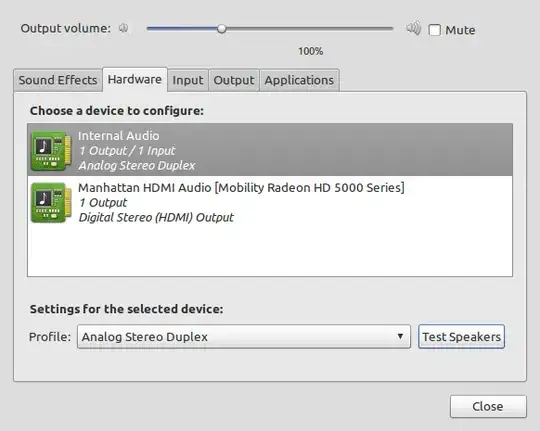
You don't mention what version of Ubuntu you are running but if it is a version up to 10.10 go to System -> Preferences -> Sound and a dialog box like below should pop up.

If however it is a Natty beta version then select the applications tab in Unity and search for Sound.

Sound Preferences

Ensure you have the Internal Audio selected and try a test on your speakers.

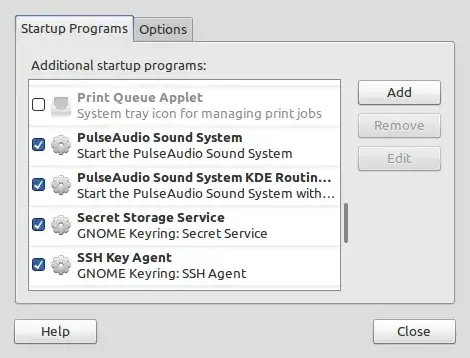
You should also check your start up programs and ensure Pulse Audio is selected by going to System -> Preferences -> Start Up Applications - or the applications tab in Unity and search for start up applications and ensure Pulse Audio is selected as below;

Start Up Programs

Mark Rooney
  • 6,329
  • @Harbhag - happy to help, I assume from your edited question Pulse Audio was not selected to start? – Mark Rooney Apr 25 '11 at 22:32
  • I was disabling the unnecessary services to start during boot up and I un-selected the Pulse Audio by mistake. – hsinxh Apr 26 '11 at 02:44