I had installed some programms with Wine, but I removed Wine from my computer. Now when I browse all applications in the Unity menu, the symbols of the programms I installed with Wine are still there.
How can I remove them?
It should be enough to remove the local wine folder ~/.local/share/applications/wine.
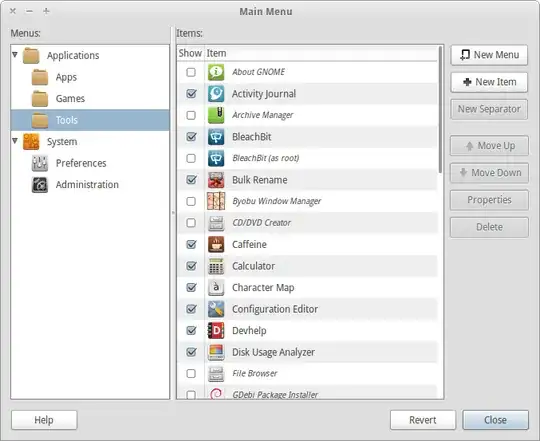
You can use alacarte in order to enable/disable applications using GUI.
Also you can directly remove the wine .desktop files on /home/user/.local/share/applications.
To remove these leftover menu entries, carefully paste the following commands into a terminal:
rm -f ~/.config/menus/applications-merged/wine*
rm -rf ~/.local/share/applications/wine
rm -f ~/.local/share/desktop-directories/wine*
rm -f ~/.local/share/icons/????_*.{xpm,png}
rm -f ~/.local/share/icons/*-x-wine-*.{xpm,png} }}}
Source: https://wiki.winehq.org/FAQ#Uninstalling
I posted it here as other answers weren't enough for me. Also I didn't use the last two commands as I didn't find such icon names manually.
You can navigate to the Wine programs directory and delete files, then use Bleachbit (a CCleaner-like application) to clean broken links an so on.
Go to the Main Menu, scroll to where the left over entries for Wine programs are, now de-select them and then for each one click delete.
rm ~/.local/share/applications/wine-*. – Big McLargeHuge May 29 '16 at 18:27