I tried turning the shadows off with CCSM, but it does not work ;/
System info:
Ubuntu 11.04 NN x64 desktop, HP ProBook 4520s, Unity
I tried turning the shadows off with CCSM, but it does not work ;/
System info:
Ubuntu 11.04 NN x64 desktop, HP ProBook 4520s, Unity
I think you have to choose a theme other than Ambiance or Radiance, because those override compiz's shadow settings.
If you really want to use the Ambiance borders without shadows:
cp -R /usr/share/themes/Ambiance ~/.themes~/.themes/Ambiance/metacity-1/metacity-theme-1.xml and remove all of the <shadow> tags. Update 2015-01-21 In recent versions of Ubuntu you'll need to use Ubuntu Tweak Tool in step 3, since recent versions of the control center don't support custom themes.
If you're using Ubuntu 15.04, do the following.
Install CCSM as in the previous answer above.
sudo apt-get install compizconfig-settings-manager
Run ccsm and click on "Ubuntu Unity Plugin"
Click on "Decorations" tab and click on "Overrride Theme Settings".
The shadow should disappear since the default "Active window shadow color" is transparent.
I got a better answer....
You will see instant change right away in shadows of dialogue box... or anything... :)
Also, if you are doing it for tweaking Linux... then... ALSO DO :
You can keep Ambiance as a theme, actually, or remove the shadows without editing the .xml files. You just have to open gconf-editor, via the terminal or Alt+F2, and then go to apps > metacity > general and uncheck "compositing manager". An additional advantage of this, if you've decided you like transparency in the terminal, is that, however many windows you have opened, the transparency is relative, not to the other windows (which can be confusing), but to the underlying desktop background.
The setting is not controlled by Compiz; they are part of the ambiance theme. Here is what I did to tame the shadows. Open a terminal and complete the following:
cd /usr/share/themes/Ambiance/metacity-1
sudo nano metacity-theme-1.xml
Find the line (use Ctrl+w to search) that says:
shadow radius=”45.0″ opacity=”0.75″color=”#abde4f” x_offset=”1″ y_offset=”4″
Change the radius to a value you can deal with - I chose 10. Save and exit with Ctrl+o and Ctrl+x.
You may also want to move this theme to your local .themes folder - this can be done with:
cp /usr/share/themes/Ambiance/ ~/.local/share/themes/AmbianceCustom/
Here are my final instructions that worked in full for me:
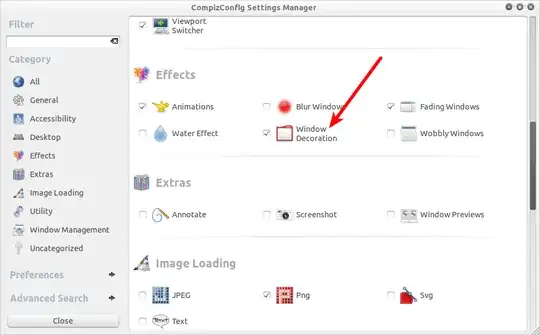
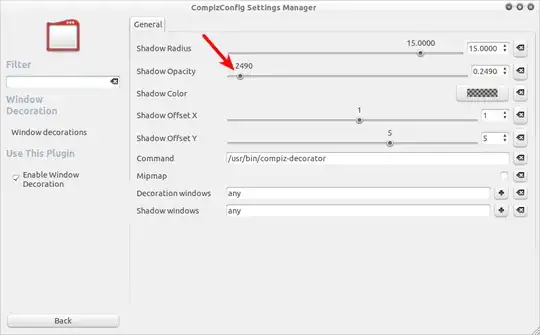
CompizConfigSettingsManager > Effects > Window Decoration > Shadow radius and shadow to 0.
Then: sudo nautilus /usr/share/themes/Ambiance/metacity-1
Then: Make new copy of metacity-theme-1.xml called metacity-theme-1.xml.originalwithshadows
Then:Edit metacity-theme-1.xml
Remove all lines beginning with: <shadow...>, Save the file, Right-click desktop > Change desktop background, Themes tab, Ensure Ambiance is selected as theme
– nLinked May 03 '11 at 22:09