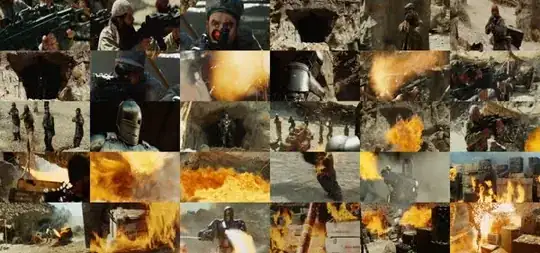
I am wondering how to use ffmpeg to create video thumbnails something like this (taken from a VLC forum):

I know totem can do this but totem does not support the video format that I am using
This article says that ffmpeg can do it.
I am wondering how to use ffmpeg to create video thumbnails something like this (taken from a VLC forum):
I know totem can do this but totem does not support the video format that I am using
This article says that ffmpeg can do it.
ffmpegIf you're using anything older than Ubuntu 15.04, then the so-called "ffmpeg" package from the repository refers to a fake version from the Libav fork which does not have the functionality you need, so you will have to download a static build of ffmpeg or follow a step-by-step guide to compile ffmpeg.
select, scale, and tile filters:./ffmpeg -i input -vf "select=gt(scene\,0.4),scale=160:-1,tile" -frames:v 1 \
-qscale:v 3 preview.jpg
In this example the output will be 960x450. You can add an additional scale filter if you want to change that, or you can change the size of each tile. Example for 600 pixel wide output:
./ffmpeg -i input -vf "select=gt(scene\,0.4),scale=160:-1,tile,scale=600:-1" \
-frames:v 1 -qscale:v 3 preview.jpg
You can even add text to the output. This example will add 24 pixels of black padding to the top of the image and add the text "Iron Man" in the center of the padding.
./ffmpeg -i input -vf "select=gt(scene\,0.4), \
  scale=160:-1, \
  tile, \
  scale=600:-1, \
  pad=iw:ih+24, \
  drawtext=fontsize=30:box=1:fontfile=/usr/share/fonts/TTF/Vera.ttf:text='Iron Man':x=(w-text_w)/2:0"
  -frames:v 1 -qscale:v 3 preview.jpg
You can control output quality with -qscale:v. Effective range is a linear scale of 2-31; where 2 is best quality.
See the select filter documentation for more info.
FFMpegThumbswhich is in the standard Ubuntu repository – thom Nov 15 '13 at 18:03