8

Changes using setxkbmap reset after a minute or two in Ubuntu 13.10. I've been using setxkbmap to modify my keyboard settings for years using Ubuntu, and after the upgrade to 13.10, the changes don't hold for longer than a few minutes.

This is NOT a duplicate. I'm asking specifically why changes made using setxkbmap are reset after a minute or two in Ubuntu 13.10. I'm not asking how to switch keys using other programs like xmodmap, xbindkeys, etc.
Alan
  • 81
  • 1
    What changes exactly are you trying to make? What version of setxkbmap are you using(you can see the version at the bottom when you man setxkbmap)? – jobin Apr 25 '14 at 05:18
  • I have been also using that method since 13.04, I upgraded to 13.10, I had added that command to startup list to run it in user login, it works well. Try to disable it in startup list – kenn Apr 25 '14 at 11:25

2 Answers2

2

Gnome

Gnome preserve xkb options.

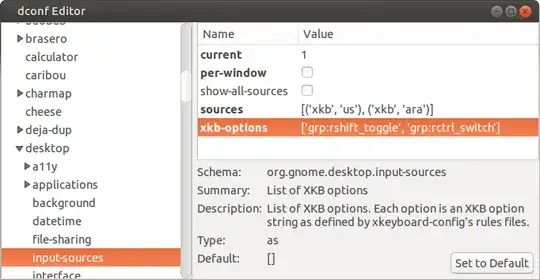
  1. Use dconf-editor → Follow path /org/gnome/desktop/input-sources

  2. Put layouts needed in sources, example:

    [('xkb','us'),('xkb','ara')]
    
  3. Add setxkbmap options to xkb-options, example:

    ['grp:rshift_toggle', 'grp:rctrl_switch']
    

    enter image description here

Unity & Gnome

xkb setting seems to be reset by Unity/Gnome settings daemon (periodically or when clicked to change layout) or when layout switch shortcuts used.

The above the method may not work. So this should disable completely the settings daemon layout control capability. Tested on Ubuntu Unity 15.10 .

  1. Rename the keyboard plugin of settings daemon to disable it.

    sudo mv /usr/lib/unity-settings-daemon-1.0/libkeyboard.so /usr/lib/unity-settings-daemon-1.0/libkeyboard.so.disabled
    
  2. Restart the settings daemon

    restart unity-settings-daemon
    

Note:

  • Ubuntu <= 13.10, Gnome & Unity uses same daemon (gnome-settings-daemon).
  • Ubuntu >=14.10, Gnome has gnome-settings-daemon & Unity has unity-settings-daemon
user.dz
  • 49,295
  • Does it mean it would become impossible to switch layouts after that (in Unity)? – Roman Shapovalov Sep 23 '14 at 17:13
  • 1
    @RomanShapovalov, It's possible, XKB will take care of it using grp: shortcut you have chosen example Right CTRL. But there will be no indicator and Unity shortcut to change layout will not work. – user.dz Sep 23 '14 at 21:49
  • Thank you, it worked. Is it possible to configure it to remember layout for each window? – Roman Shapovalov Sep 24 '14 at 10:19
  • 1
    @RomanShapovalov Well, remembering layout for each window is not provided by xkb (xserver). It's either provided by Window Manager or a separate tool (like in Gnome, gnome-settings-deamon). You may try xxkb. – user.dz Sep 24 '14 at 10:59
  • 1
    UPD. In Ubuntu 15.04, the service is located in indicator-keyboard/indicator-keyboard-service – Roman Shapovalov Jun 12 '15 at 11:51
  • For some reason, it resets after another user logs into the system. – Roman Shapovalov Dec 14 '15 at 18:53
  • @RomanShapovalov , I've updated my answer with definitive solution that disable the keyboard layout plugin the setting daemon. Please, could you check it. Looking for your feedback. – user.dz Dec 14 '15 at 19:28
0

I was trying everything and nothing worked, then I found that keyboard layout indicator I used (gxkb) has its own config ~/.config/gxkb/gxkb.cfg!

[xkb config]
group_policy=2
default_group=0
never_modify_config=false
model=pc105
layouts=us,ru
variants=,
toggle_option=grp:shift_caps_switch,nbsp:none,shift:both_capslock
compose_key_position=

So for me it was not Gnome/Unity problem, but gxkb's config.

shitpoet
  • 103