15

In 2012 I used Ubuntu's gnome-disks utility to encrypt an external drive.
Last year I was still being able to unlock it.

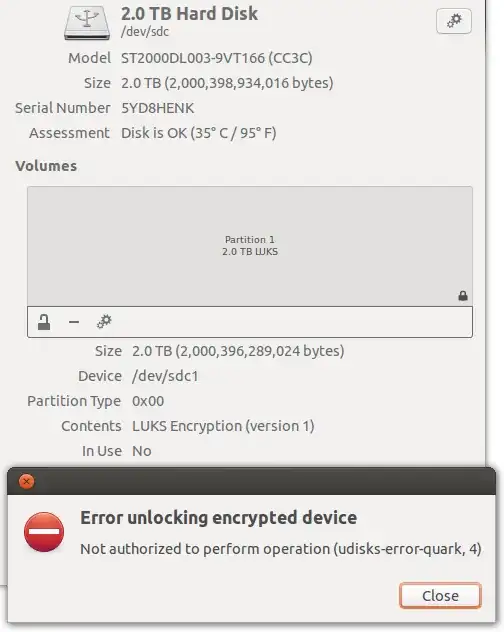
But today I tried again on Ubuntu 2012.04 and gnome-disks says:

Error unlocking encrypted device
Not authorized to perform operation (udisks-error-quark, 4)

How to solve this and unlock my data?

Not authorized to perform operation (udisks-error-quark, 4)

Braiam
  • 69,302
Nicolas Raoul
  • 11,941

6 Answers6

24

The problem can be solved with sudo:

gksudo gnome-disks

then, operate normaly

David Foerster
  • 36,900
  • 56
  • 98
  • 152
  • This worked for me. – Hitesh Sahu Oct 26 '18 at 11:32
  • Why do we have to use sudo now but didnt before? This just started happening to me! – Gabriel Staples Dec 15 '19 at 02:09
  • 6
    Ubuntu 18 removed gksudo, so I just used sudo gnome-disks instead. There seemed to be a big delay (~5 seconds) between clicking the button to unlock the partition and the dialog popping up for me to type the password in, but otherwise it worked just fine. – Gabriel Staples Dec 15 '19 at 02:19
  • I've accessed "Disks" window manually and haven't been able to mount. Now this command opened the same window but now it mounts. TY! – testing_22 Jan 07 '22 at 11:46
  • Disks used to ask for a password itself (e.g. when starting the disk benchmark) without the need to run it using sudo, but after I have reinstalled Ubuntu, it just shows the error message instead of asking for a password. What may be the reason? I have been using the same version of Ubuntu before the re-installation. – David Ferenczy Rogožan Oct 19 '23 at 14:14
10

The error code 4 returned by udisks2 (which is used by gnome-disks-utilities internally) is the constant UDISKS_ERROR_NOT_AUTHORIZED_CAN_OBTAIN in code.

This code is returned, if the current subject (the gnome-disks applications, actually) is not allowed to do the unlock operation, however it might be allowed if further authentication would be provided, typically by providing the system administrator's (root) password.

Such additional password query is typically handled by a so-called authentication agent. It seems that this agent is not setup correctly in your environment.

I had the same problem using gnome-disks within an i3wm-session (in archlinux -- however this should be similar under Ubuntu): After having installed the (legacy) "polkit-gnome" authentication agent (and starting it in a session startup script), I got first the passphrase dialog for specifying the LUKS passphrase of the device and then a second dialog asking for the root password.

The command line hack you mention can alternatively also be done using udisksctl in an cleaner way:

udisksctl unlock --block-device /dev/sda1
udisksctl mount --block-device /dev/mapper/my_encrypted_volume

Note that the udisksctl unlock will ask for the (same) two passwords as gnome-disks would do when the authentication agent is setup correctly. No need to use sudo here.

For further information, dig into udisks2 and polkit documentation or look into udisks2 source code directly. This is how I understood and finally solved the problem for me.
  • 1
    Error unlocking /dev/sda1: GDBus.Error:org.freedesktop.UDisks2.Error.Failed: Error unlocking /dev/sda1: Failed to activate device: Operation not permitted – Mehdi Aug 15 '19 at 12:43
2

I had this same problem with a 4TB disk. The disk used the MBR partition table, which has a 2TB limit. Changing the partition table to GPT (GUID Partition Table) fixed the problem. The Ubuntu Disks application didn't mention this. GParted helped me out.

(The thing that bugs me though is that I have used this disk as external storage via USB, and that has worked somehow. Maybe I'm wrong about the MBR, but the reset to GPT fixed my problem. Posting here because somebody might have the same issue somehow.)

SPRBRN
  • 2,575
2

What helped me is very similar to Thrushbeard’s explanation, but I can’t post comments yet.

I installed mate-polkit and then executed /usr/lib/x86_64-linux-gnu/polkit-mate-authentication-agent-1. If you’re not using Mate, then there’s an overview over all the Polkit packages. Click the respective link on that wiki page and then “View the file list for [package]” to find the name of the executable for your environment. I hope it helps!

1

The problem can be solved via command line:

sudo cryptsetup luksOpen /dev/sda1 my_encrypted_volume
sudo mkdir /media/adhoc
sudo mount /dev/mapper/my_encrypted_volume /media/adhoc

You can now access your files in the /media/adhoc folder.
my_encrypted_volume and adhoc can be whatever name you want (no space), anything will work.

Nicolas Raoul
  • 11,941
0

I solved it using sudo and after @Nicolas Raoul answer mounting/umounting

sudo gnome-disks

sudo mount /dev/sda3 /mnt

sudo umount /dev/sda3