I accidentally typed ctrl + L in terminal and my terminal window jumped one 'screenful' size. I looked at the keyboard shortcuts in "Edit"->"Keyboard shortcuts" and didn't find that shortcut.
What does ctrl + L do and where is it defined?
I accidentally typed ctrl + L in terminal and my terminal window jumped one 'screenful' size. I looked at the keyboard shortcuts in "Edit"->"Keyboard shortcuts" and didn't find that shortcut.
What does ctrl + L do and where is it defined?
ctrl + L just clear the terminal screen.
It is the keyboard shortcut equivalent of the command clear -x. ref
It is property of bash, so you did not found it under keyboard shortcuts in your gnome-terminal. From man bash:
clear-screen (C-l)
          Clear the screen leaving the current line  at  the  top  of  the
          screen.   With  an  argument,  refresh  the current line without
          clearing the screen.
See a detail list of Bash Keyboard Shortcuts.
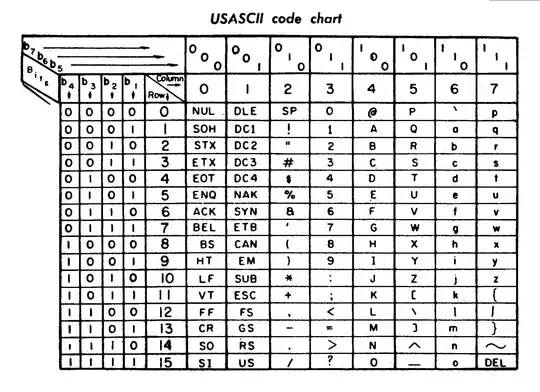
If the shell you're using is not intercepting it, you are typing a "Form-feed" character in your terminal. If the terminal application does not intercept or use the keystroke in some way, Ctrl+Letter is translated to the ASCII code of the letter minus 64(1). 65 is the ASCII code of 'A', 'L' is the 12th letter -> code 76. If the shell does not know what to do of the code, it prints it.
Printing a FF char resulted in a new page on a line printer and a clear screen on the terminal (yes, I used a VT-52 back then, at 300 baud).
So Ctrl+L is 12 which is FF. In the same way, Ctrl+I is a TAB, and Ctrl+G rings the bell --- if the terminal or the shell does not intercept it, like Ctrl+C for example.
Notice from the other answer: it seems that bash do intercept CTRL-L and do a clear. Nice touch that the bash authors associated the key with a command which will do more or less the same that the ASCII code did on old terminals!
On the other hand, in my zsh the combination CTRL-I works as TAB and CTRL-H as a Backspace(2).
Old nice ASCII... (notice that letter L is at column 4, row 12, it has ASCII code 4*16+12=76).
Original Image here, from wikipedia article on ASCII.
(1) Ctrl really used to clear the bit 7.
(2) this is the source of the "fail to remove word" joke you sometime find like for example "this was a bad^H^H^Hnot so nice idea"... (with normally a word stronger than bad!)
^Hs or ^Ws is nice when you can't use strikethroughs. :)
– Blacklight Shining
Mar 14 '14 at 23:47
Control-L is intercepted and interpreted by bash (actually by the readline library, which handles interactive editing on the command line). It is bound to the clear-screen function, as @souravc wrote.
Note on the meaning of Control-L: It is defined as Form Feed in the ASCII character table, but this means nothing unless some program interprets it accordingly. The terminal does not clear the screen when it sees a form feed, as you can verify by by saving a ^L in a file and printing the file with cat. When bash/readline sees the ^L, it executes the clear-screen function. This sends a sequence of characters that is understood by your terminal emulator (as described by termcap or terminfo), and has the effect of clearing the screen.
In very old printers, a ^L would advance the paper start printing on the next sheet, hence the name "form feed". But modern terminals and terminal emulators follow a newer ANSI standard, in which control commands are multi-character "escape codes" that begin with ^[ (escape). When bash sees your ^L, it is probably sending the two-command sequence ESC [ H ESC [ J, which moves to the top left of the screen and clears everything below it (hence the whole screen).
ESC [ ESC [ J also clears the command history, whilst the CTRL + L sequence doesn't.
The sequence sent to the terminal is rather ESC [ H ESC [ 2 J, go ahead an try it yourself with this command: printf "\033[H\033[2J".

clear, because it doesn't erase your terminal history, while the commandcleardoes, unless you add the-xargument, like so:clear -x. – jirislav Apr 19 '19 at 19:10-xoption ofclear?man cleardid not help me. – sourav c. Apr 20 '19 at 06:31ncurses-binpackage? I have 6.1. – jirislav Apr 22 '19 at 15:33clearman pages from 18.04 onwards i.e. from ncurses version 6.1 – sourav c. Apr 22 '19 at 15:52vim,less, and most n-curses applications will redraw the display when they receive a Ctrl-L character. It's more or less a de-facto standard. – Nov 28 '19 at 03:26