3

I've been looking for a while now a way to get the "click lock" in ubuntu 13.10 (for dragging) but so far, I have no success. Universal access lacks this feature, and I have not found some program or utility that allows me simulate it.

According to this question, it seems that in ubuntu 10.10 there was no way to get it working, but I wonder if this issue has been addressed in the latest versions.

With this command,xte "mousedown 1" I get the desired functionality, but still you would need to type the command on a terminal or bind it to a key. Is there a way to get the same functionality by long pressing the button click?

Thanks for any help.
Seth
  • 59,442
  • 44
  • 149
  • 201
nowxue
  • 153
  • 1
    According to "which" question,if you can't post the link in question, post it in comment and we would take care of it. – Registered User Apr 10 '14 at 04:26
  • @AdityaPatil sorry, I didn't notice the link wasn't included in the question. The question is http://askubuntu.com/questions/24558/where-is-the-accessibility-mouse-click-lock?rq=1. – nowxue Apr 10 '14 at 13:43
  • By lock click do you mean that once you click(or do something) it will work as if you have clicked and not released the mouse button? – Registered User Apr 10 '14 at 14:08
  • @AdityaPatil yes, with Lock click you can drag and highlight without having to keep the mouse button pressed. In Windows, you just press for a moment the mouse button, to release it, you just click again. – nowxue Apr 10 '14 at 14:37
  • I have something that may help, I'll write an answer. – Registered User Apr 10 '14 at 14:38
  • 1
    For the Windows "Click Lock" similar feature on Ubuntu, you can have a look at: http://blog.mbirgin.com/?c=page&ID=550&t=lockeddragsclicklockinubuntulinux – podcast Dec 24 '16 at 11:05

2 Answers2

2

What you need is kmousetool.According to man kmousetool,

KMouseTool clicks the mouse whenever the mouse cursor pauses briefly.

<p>KMouseTool can also be configured to wait for a specified time for a drag to begin, before unclicking the mouse. This way, you can use it for drag and drop operations as well.</p>

To install kmousetool, open a terminal and type

sudo apt-get install kmousetool

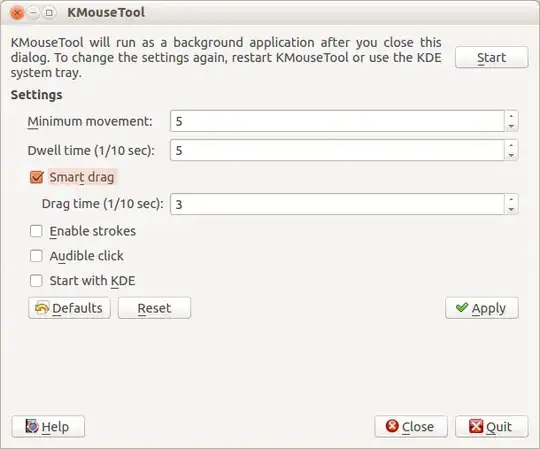
Open kmousetool and you will see a window like this. enter image description here

Here enable Smart drag and let the defaults "as is" for now. Click Apply and then click Start. You are ready to go.

This app requires a bit of practice and may seem hard to use at first, but with proper settings(which you may choose to change once you get acquainted) and a bit of practice, this can become a handy tool for anyone.

Registered User
  • 9,771
  • 15
  • 55
  • 86
  • Hi, it's not exactly what I want, as you say it's difficult to use. Especially, given that is not based on the left click by itself, but instead whenever I put the cursor and leave the mouse, a click is simulated, which makes it really hard to use. I'll give it a try for now, but hoping there is a better way. Thanks. – nowxue Apr 10 '14 at 19:32
1

this obscure git repo is what you're looking for.

https://github.com/germag/clicklockd

git clone https://github.com/germag/clicklockd.git
cd clicklockd
make
sudo ./clicklockd -t 2 -b

And it works exactly as Windows ClickLock feature. Took me years of frustration and sudden luck to find it, it is not really simple to implement it correctly.

  • When I run make, I get event_loop.c:31:21: fatal error: libudev.h: No such file or directory. How to solve this problem? – Pankaj Joshi Apr 06 '19 at 16:08
  • sudo apt-get install libudev-dev solved the problem on Ubuntu 16.04. Thanks to the author of https://github.com/germag/clicklockd – Pankaj Joshi Apr 08 '19 at 19:48