15

I have a Lubuntu (now 14.04) installation. Recently, I logged in to find that the Wi-Fi icon had disappeared, and there was some sort of a keyboard icon in it's place. I have restarted multiple times, but it doesn't fix it. I can't find the same applet in the panel settings, and resetting the panel didn't help. When I try to manually start nm-applet, it starts, but prints a bunch of warnings to the console:

nm-applet-Message: using fallback from indicator to GtkStatusIcon

It then starts, using ugly icons for the Wi-Fi connectivity symbol.

What do I need to do to make it start correctly? Once it starts, why isn't it using the right icons?
bain
  • 12,260
Wasabi Fan
  • 367
  • 3
  • 4
  • 13

1 Answers1

16

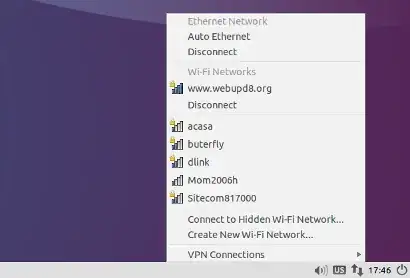
To fix the Network Manager not showing up on the panel issue, from the Lubuntu menu select Preferences > Default applications for LXSession, then click on the Autostart tab and under "Manual autostarted applications" type "nm-applet", then click the "+ Add" button on the left:

Now log out, log back in and you should see the Network Manager icon on the panel: http://www.webupd8.org/2014/04/fix-lubuntu-1404-network-manager.html

enter image description here

karel
  • 122,695
  • 134
  • 305
  • 337
Wild Man
  • 8,327
  • I was thinking about that, but if it's not working, isn't that just a patch, and not a fix? I think the problem isn't that it's not being run, but that it's failing and exiting when it's run. What normally runs it? Is it just listed in the startup list? – Wasabi Fan Apr 20 '14 at 20:21
  • What does this command tell you? ps aux | grep nm-apple that will let you know if it is running, but what I posted in my answer is a fix to a bug issue with lubuntu 14.04 where nm-applet does not show in the panel – Wild Man Apr 20 '14 at 20:24
  • OK... is this really a problem with Trusty? I had assumed I screwed something up. I'll test this as soon as it finishes what it's installing. – Wasabi Fan Apr 20 '14 at 20:43
  • I just tested this, and it got it to show up. But the icon still looks wrong; why can't it find the right icons? – Wasabi Fan Apr 20 '14 at 21:00
  • It may be because of the bug or did you do an upgrade instead of a fresh install? I really do not have a fix for that, I am glad it is showing up now, please accept the answer to help other people since the icon is no longer missing. I suggest starting a new question just for the ugly icon issue. Thanks – Wild Man Apr 20 '14 at 21:57
  • Even if you run Lubuntu with a simple window manager (Blackbox in my case) which doesn't have an applet toolbar, you only need to run nm-applet once (in LXDE) and connect to your network. On subsequent reboots you will be connected automatically. – August Karlstrom Apr 29 '14 at 11:19
  • None of this works for Gnome-Shell. – Cerin Jan 03 '15 at 02:50
  • Never said it did, it is for a bug in lubuntu about 9 months ago. – Wild Man Jan 03 '15 at 16:48
  • @WildMan What theme is this? – rafael.js Feb 23 '17 at 19:15
  • @RjQuery , I do not know, karel edited that answer so it is his theme. – Wild Man Feb 23 '17 at 19:38
  • @karel What theme is this? – rafael.js Feb 23 '17 at 21:04
  • @RjQuery It's LXDE with Lubuntu-default theme like this Lubuntu 14.04 screenshot – karel Feb 23 '17 at 23:25
  • @WildMan how does it work in Ubuntu 20_04 with lxqt? nm-applet works, but the gui solution.. – Timo Sep 21 '20 at 18:43
  • 1
    @Timo, I have not used lubuntu in quite sometime so I asked a friend of mine that is heavily involved with lubuntu and he said that it does not apply past 18.04/LXDE, this is the friend. https://askubuntu.com/users/469152/guiverc – Wild Man Sep 22 '20 at 03:11
  • lxnm (lxnm-applet) is LXDE so last used in 18.04 by Lubuntu. LXQt used by 18.10 & later is very similar yes but expect it to be different (a lot of LXDE devs joined with RazorQt creating the LXQt project). In 20.04 it's nm-tray (which will call nm-connection-editor from network-manager-gnome as it's a little more user-friendly than the LXQt one used in 18.10-19.10). Thanks @WildMan – guiverc Sep 22 '20 at 03:49
  • @guiverc you're welcome and thanks for looking at this comment and replying. – Wild Man Sep 22 '20 at 04:03