In Ubuntu 14.04, We know all Web apps run in ubuntu-made browser instead of firefox. I would like Gmail and some other services Webapps (in the ubuntu made browser) to launch in the startup. To do this, I need terminal command line to launch web app. I tried, gmail,Gmail, unity-webapps-Gmail,webapps-Gmail. Nothing I tried works. I request someone to help me.
Asked
Active
Viewed 3,467 times
4
2 Answers
5
You can start Ubuntu Web Browser by
$ webbrowser-app <address>
$ webbrowser-app https://mail.google.com
Press Super (Windows key) type Startup Application.
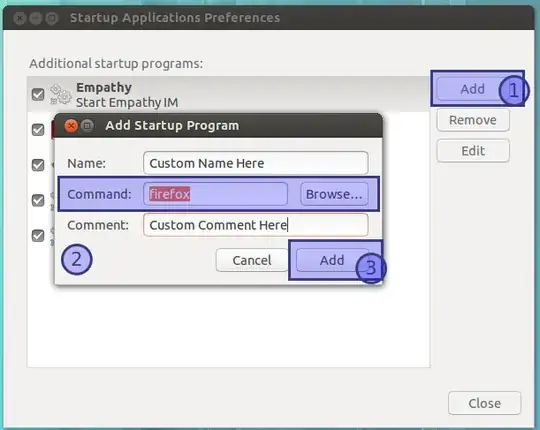
- Click
Add. - Enter whatever you want to run at startup. For eg
unity-webapps-gmail(replacefirefox). - Click Add & Close
- Next time you login it will launch
gmail(or whatever you entered) automatically for you.
All unity apps. See this.
For other services, you need to enter your service address. Replace (field 2) with webbrowser-app http://mail.google.com (or any other) for Unity Web Browser to launch with.
Happy to help.
xyz
- 1,836
0
Locate the .desktop file that is used to launch the web app
Usually present at .local/share/applications in Home directory
Copy the exec command and run it in the terminal (check for the name property in the file to make sure that it corresponds to the app you are looking for).
anonymous2
- 4,325
RHOOPH
- 1
- 1
$ webbrowser-app https://mail.google.com. – xyz May 01 '14 at 21:17