I just made a fresh install of Ubuntu 14.04.
All goes well but I can't take screen-shot with the shortcut print key. In the shortcuts settings the key is recognized.
Previously installed Ubuntu 13.04 and the shortcut worked.
I just made a fresh install of Ubuntu 14.04.
All goes well but I can't take screen-shot with the shortcut print key. In the shortcuts settings the key is recognized.
Previously installed Ubuntu 13.04 and the shortcut worked.
Dependent on the desktop you use (I don't know, if you use Unity-Desktop or Gnome-Shell or even KDE),there is a different way, how to find the app "screenshot". It is installed by default.
In Gnome-Shell: go to your menu and there go to accessories. There you will find "screenshot".
In Unity: go to the unity-lens and look for all your installed apps. There you should find "Screenshot".
In Cinnamon: go to your menu and there to "accessories" and there to "screenshot"
In KDE: to to your KDE-menu and there to "accessories" and there look for "screenshot".
This app is really easy to handle and lets you save your screenshot in your selected folder. So no problem of taking screenshots in Ubuntu or even LinuxMint.
As I understood from here it is problem with HP laptops, and prt sc button will work normally when you connect a usb keyboard.
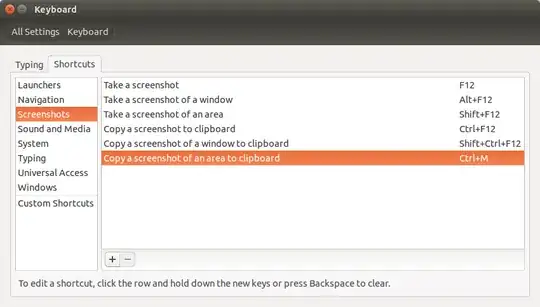
As temporary solution till the bug is fixed we can change shortcut for screenshot to some unassigned key combinations.
Goto System Settings > Keyboard change Print to F12 etc.
Same problem on HP Pavilion dm1. My solution is to press Fn + Delete
Not much of an issue for me since the delete key is just beside the prt sc key. Beats having to go through lines of code. I guess its a case of wrong keyboard mapping. Hope this helps.
On my new Toshiba satellite, the F keys customization overrides the standard mapping.
Press the FN key and hold before the usual regular variations - I tried all three and works fine for me, YMMV.
I have 14.04 with GNOME 3 and LXDE desktop (I don't use Unity)
For GNOME 3 the screenshot goes to my home/<username>/Pictures folder.
For LXDE the screenshot goes to my home/<username> folder.
In LXDE ALT+Print Screen requires you to highlight the screen area using the mouse.
In older Ubuntu versions I got a popup window asking me whether I wanted to save the file or just copy the image to the clipboard. Now it apparently just saves the file.
LDXE: In my /home/<username>/.config/openbox/lxde-rc.xml file it shows that I am running scrot when I press Print Screen and scrot -s when I press ALT+Print Screen.
Sorry, I can't check the location in Unity, but I would recommend you doing a file search and press the Print Screen button to see where the PNG files are popping up.
LDXE is just an alternative desktop to replace Unity or GNOME. It is still Ubuntu 14.04.
Print Screenkey may not work. – Cornelius May 01 '14 at 20:50