I need to format a drive containing an old install of Ubuntu 10.04, to install Vista (not my idea!) Vista setup apparently refuses to format non-FAT32 or NTFS partitions. However, I can't seem to format it from my live CD (Ubuntu 11.04) at all; I keep getting "device is busy" errors. What is the simplest way to format this drive?
Asked
Active
Viewed 8.3k times
2 Answers
23
From a live session start Gparted Partition Editor from System -> Administration:
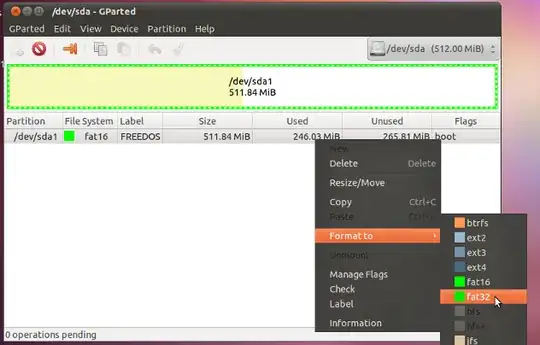
Choose the drive you need to re-partition or format from the top right. Then select your partition (in this case /dev/sda1). By right click on the partition a menu pops up that lets you choose to Delete or Format this partition.
Partitions need to be unmounted before changing them
In case you install another OS it may be sufficient to just delete all partitions leaving the drive unpartitioned. Partitoning and formatting will then be done by the new OS's installer.
We have to keep in mind that private data on that drive will still be recoverable after deleting or reformatting partitions.
Takkat
- 144,810
0
The simplest way, I would argue, is to put the Windows Vista DVD in the drive and start the installation process.
The Windows Vista DVD should be capable of formatting the disk to the Windows native partition(s) (NTFS or FAT32) you require for Windows installation.
This will cut out one step in the process.
Is that an option for you? Or do you have some special need to use a Linux Live CD?
Remember to first back-up any valuable data on partitions you plan to nuke.
boehj
- 2,101
-
-
1Damn. OK, another option that I like is to use a GParted Live CD. If this thing can't delete a partition table then the next step is to get something like, for example, the Western Digital Diagnostics disk to write 0's to the whole disk. NB: This can also be achieved using the
ddcommand in a terminal. – boehj Jun 01 '11 at 23:00
dd if=/dev/null of=/$hd($hd=[/hda1|/sda1|...)] or if you're more paranoidif=/dev/randomor even urandom – mbx Jun 02 '11 at 02:55