30

Usually I had installed Image Magick on my Ubuntu systems with a command like this

sudo apt-get install imagemagick

or like this:

sudo apt-get install php5-imagick

Right now I am running the latest 14.04, and those packages seem to have disappeared from the repositories. Am I missing something? Have they been obsoleted? How could I install ImageMagick now?
  • you can use this code: https://gist.github.com/rodleviton/74e22e952bd6e7e5bee1 don't forget to read my comment under the code, you should change the path of download. – Babak Niknia Oct 08 '14 at 10:02

4 Answers4

50

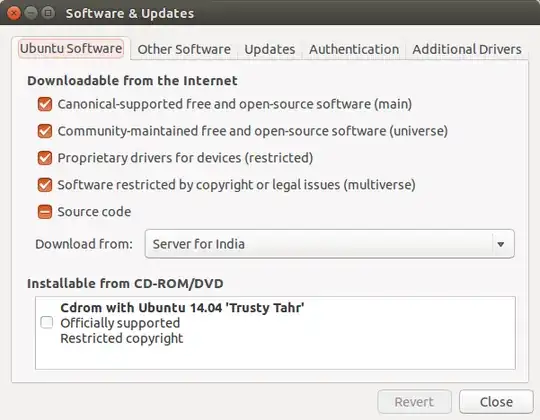
The package you are looking for is imagemagick. Confirm that you have all sources check marked in "Software and Updates":

software and updates package sources

and then update the package list by opening a terminal(Ctrl+Alt+t) and then typing the following:

sudo apt-get update

and enter you password and then

sudo apt-get install imagemagick php5-imagick

and then press Return to confirm the installation.

jobin
  • 28,667
8

In Ubuntu 14.04, imagemagick is available on main repository & php5-imagick is available on universe repository. So follow command in terminal:

sudo add-apt-repository main
sudo add-apt-repository universe
sudo apt-get update
sudo apt-get install imagemagick php5-imagick
muru
  • 207,970
Pandya
  • 37,469
  • 5
    Just FYI, on Amazon EC2 Ubuntu 14.04 (at least N.Virginia region), universe repository is enabled by default. Check /etc/apt/sources.list. – Dimitry K Nov 24 '14 at 15:15
2

this did the trick for me...

sudo apt-get install php5-imagick
sudo service apache2 reload
1

I used the following:

sudo apt-get update
sudo apt-get install imagemagick php-imagick

and also had to restart apache before it started working:

systemctl restart apache2
danlynn
  • 41