2

I have a freshly installed ubuntu 14.04.

In settings "Brightness and locking" I had the following Settings:

Turn monitor off after "10 Minutes"

Locking: On

Monitor locking after "5 Minutes" and "Ticked" Ask for password ...

(Sorry my System is in German, hopefully I have the right translation).

What happens:

System gets locked after 5 Minutes but never turns off. I always see the login Screen.

I tried to switch the times (First turn off, then login etc...) but always the same result. I can, however manually select standby. Then the monitor switches off. But then i can't wake up the system anymore. No Mouse or Keyboard reaction...

I have the standard Ubuntu graphics driver installed. No extra atm (fglrx) etc.

Here is a example screenshot of my settings. Monitor does not turn off after 10 Minutes. I also tried "Monitor off after 5 Minutes and Screenlock after 10 Minutes". Monitor does not turn off.
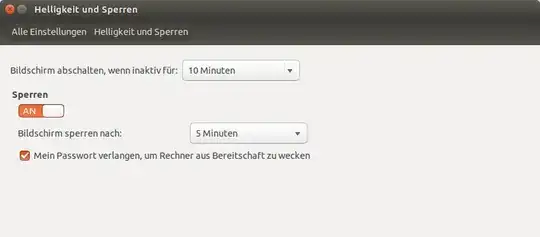
Screenshot settings

Because of 2 comments telling me "It turns off AFTER 10 Minutes". Well I know it's not meant to turn off immediately. But it is not turning off after 10 minutes and not after 30 minutes and not tomorrow ;)

Evenbit GmbH
  • 4,736
  • It turns off when Inactive for "10 Minutes" – αғsнιη Jun 16 '14 at 08:32
  • 2
    No. It doesn't. – Evenbit GmbH Jun 16 '14 at 08:48
  • you have asked to lock after 5 mins, and display turn off after 10 mins... after 10 mins it will off... if not please update screenshot for your settings... – A J Jun 19 '14 at 07:12
  • 2
    It does NOT turn off! No matter what times I set. – Evenbit GmbH Jun 19 '14 at 07:14
  • try lock->on, and select "Lock screen after : Screen turns off" – A J Jun 19 '14 at 07:19
  • 1
    Well. Please again read the question. As i write: No matter what settings, it does not turn off. – Evenbit GmbH Jun 19 '14 at 07:21
  • wait let me check with my system and I will reply to you... – A J Jun 19 '14 at 07:26
  • Now I understand your problem, unfortunately I didn't have a solution still now, Can you update screen-shot for All settings -> Displays; and tell me please weather you using laptop or desktop system? – A J Jun 19 '14 at 07:48
  • Hi. Thanks for your effort. I'm using a desktop system with triple monitor setup. What do you need to know from display settings? – Evenbit GmbH Jun 19 '14 at 07:54
  • Another possibility is external vibration. A sensitive optical mouse can keep a system running (due to loud music or other vibration) virtually indefinitely. – Elder Geek Jun 23 '14 at 19:20
  • @rechengehirn, try with xset -s on ; xset +dpms also open a terminal and watch for X idle if does reset may hardware sensibility watch -n1 xprintidle (should install xprintidle 1st) – user.dz Jun 25 '14 at 09:21

1 Answers1

2

It looks like its a bug. See here.

The fix is to install Unity source release 7.2.1, . The file to be downloaded Unity 7.2.1 "14.04 SRU 1" is also listed on the same Launchpad page.

Mitch
  • 109,937