To install OneDrive on Ubuntu, I've followed the instruction from here: OneDrive-D Syncs Files to and from Microsoft
The installation seems right, till the end, when the "preferences" window appear, I clicked on the "Connect to the OneDrive.com" buttion:
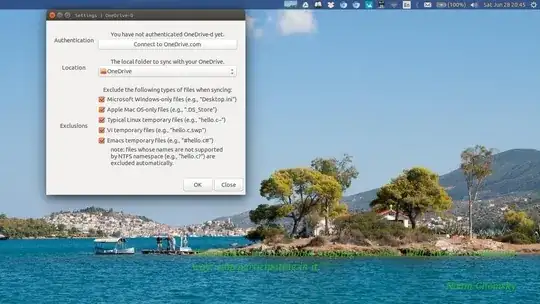
An error occured:
:~$ onedrive-prefs NOT SANDBOXED [ERROR:flash/platform/pepper/common/pep_process.cpp(19)] CHECK(g_process_type == PROCESS_TYPE_UNKNOWN) failed java version "1.7.0_55" OpenJDK Runtime Environment (IcedTea 2.4.7) (7u55-2.4.7-1ubuntu1) OpenJDK 64-Bit Server VM (build 24.51-b03, mixed mode) Aborted (core dumped)
How to solve it?