I want Firefox to purge anything other than authentication cookies every session - how can I configure it?
Asked
Active
Viewed 1,350 times
3 Answers
3
Go to Edit >> Preferences >> Privacy, untick everything except for cookies. Make sure to select the option "Clear History when Firefox closes" and to select "Cookies" in the advanced options.
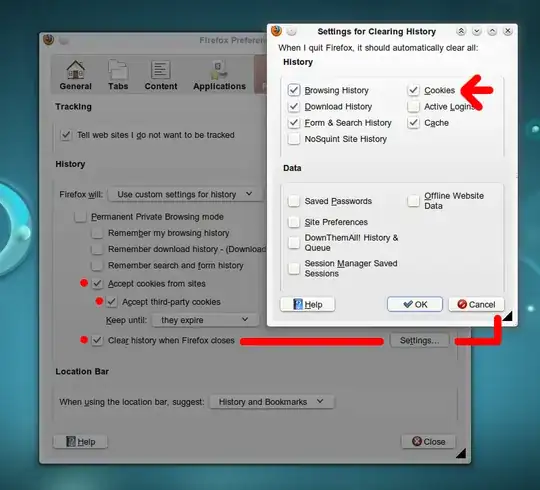
Then install Biscuit add-on. This extension allows to select which cookies will be preserved when you close Firefox. You can select all cookies from specific sites or just the authentication cookies.
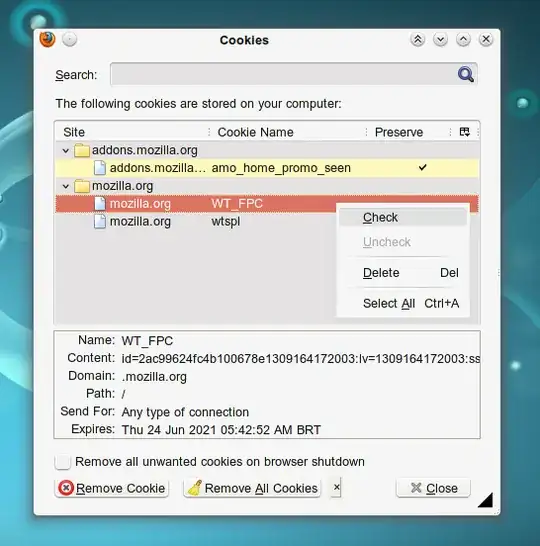
Make sure to tick the option "Remove all unwanted cookies on browser shutdown" at the bottom of Biscuit preferences.

lovinglinux
- 6,427
-
Ah, need more addons, do I? Thanks! – Oxwivi Jun 27 '11 at 13:49
-
Well, it does the job very well. I have it, plus another 54 add-ons :-) – lovinglinux Jun 27 '11 at 13:52
-
You sir, is already famous for your ginormous amount of add-on you use (I frequent to Ubuntu Forums under the same name). – Oxwivi Jun 27 '11 at 14:18
-
:-) Some people don't like add-ons, but this one was the definitive solution to my cookie problems. – lovinglinux Jun 27 '11 at 16:44
-
I fall in the category of not liking to use too many add-ons. If possible, I want to take advantage of built-in features before going to a third-party. – Oxwivi Jun 27 '11 at 16:47
-
In this case, I don't think you have a choice, at least not with that degree of customization. Firefox by itself doesn't offer that. However, you can for example block all cookies, but add exception rules for sites that you want to allow. You need to untick the option to delete cookies when Firefox shuts down. – lovinglinux Jun 27 '11 at 17:53
-
Yes, that's what Seppo's answer recommended, but I've tried that long ago, and it did not allow temporary cookies. That doesn't help. I want something like private browsing except the few saved cookies. – Oxwivi Jun 27 '11 at 18:13
-
Well, I guess there's no helping it, thanks for the answer. – Oxwivi Jun 27 '11 at 18:14
0
You can edit your privacy preferences from Edit -> Preferences -> Privacy
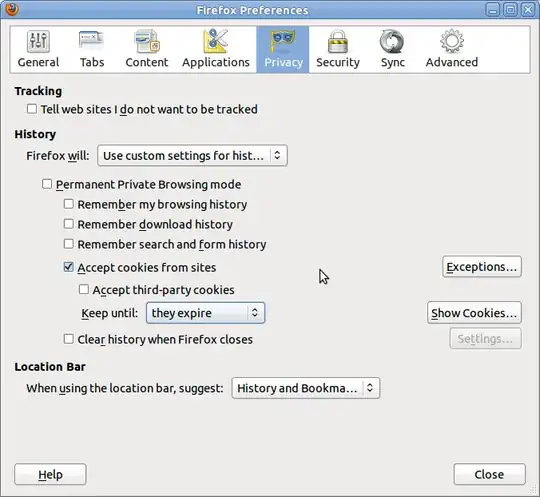
You can check away everything other than "Accept cookies" if you only want to store authetication cookies.
Seppo Erviälä
- 5,835
-
That doesn't work. If I do that, all the other sites can't save cookies. I won't be able to use any services. – Oxwivi Jun 25 '11 at 17:05
0
You are going to need to use one of the cookie management add-ons for Firefox. Once you choose one, you have to identify the specific authentication cookies to protect from deletion. Have Firefox delete everything but the cookies at shutdown, and let the cookie add-on delete all cookies except the authentication cookies you selected.
To have Firefox delete everything but the cookies, Go to Edit/Preferences/Privacy and check 'Clear history when Firefox closes', then click the Settings button.
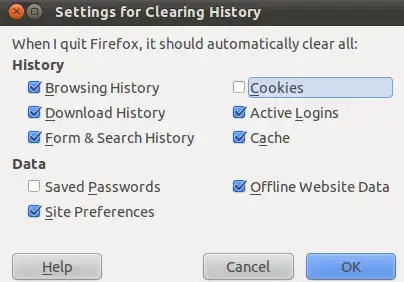
The add-ons vary, you need to check the documentation of the one you choose for how to identify and protect specific cookies.
Tom Brossman
- 13,297