Example for nomachine's NXClient:
Under 'desktop'
select 'unix' in the first drop down menu.
select 'custom' in the second drop down menu
click 'settings' on the right of it.
choose 'Run the following command' and insert:
gnome-session --session=2d-gnome
-or-
gnome-session --session=classic-gnome
and choose the 'New virtual desktop' option.
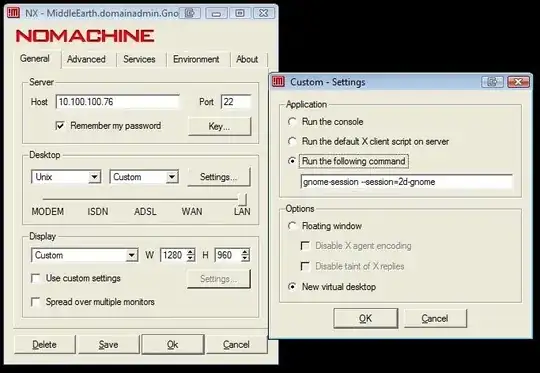
By default your system should have these 'sessions'
ubuntu
ubuntu-2d
2d-gnome
gnome
classic-gnome
ie, you could use gnome-session --session=ubuntu-2d for a 2d Unity session (no effects)
Session files sit under
/usr/share/gnome-session/sessions/

/usr/share/gnome-session/sessions/2d-gnome.session
/usr/share/gnome-session/sessions/ubuntu-2d.session
/usr/share/gnome-session/sessions/classic-gnome.session
/usr/share/gnome-session/sessions/gnome.session
/usr/share/gnome-session/sessions/ubuntu.session
Note:
'2d-gnome' and 'classic-gnome' look the same, I don't know if they differ anywhere in partituclar.
Note: '2d-gnome' and 'classic-gnome' look the same, I don't know if they differ anywhere in partituclar.- seems that 2d-gnome launches classic with the 2d Unity sidebar too, for this to crash and burn 'unexpectedly' shortly after session start, probably explaining why the two sessions 'look the same'. Needless to say I am on 'classic-gnome'. – Mathew Jun 25 '11 at 16:32ubuntu-2d. Odd that your Unity 2D is called2d-ubuntu. I've gotgdm,gnome,ubuntu,ubuntu-2d. – Nick H Dec 12 '11 at 10:52