Like Windows, I want to hit Super+D to jump to the desktop or minimize all windows. I don't see command like that in Keyboard Shortcuts. Any idea?
Asked
Active
Viewed 1.4k times
2 Answers
13
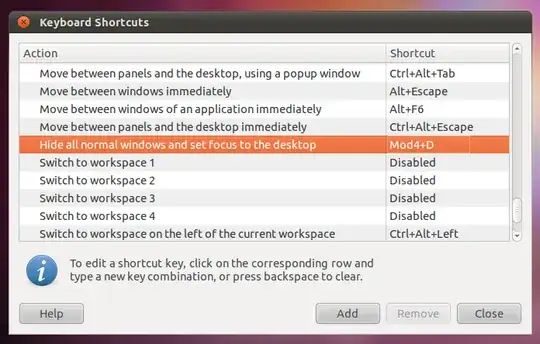
By default, it's set to Ctrl+Alt+D. You can set your own shortcut by going to System → Settings → Keyboard Shortcuts and changing "Hide all normal windows and set focus to the desktop" located under "window management":
Kris Harper
- 13,705
Bryan
- 763
-
1Sorry, didn't read the whole post. It's listed in the keyboard shortcuts as "Hide all normal windows and set focus to the desktop" located under "window management" so you should be able to change it to the super+d if you want. – Bryan Oct 08 '10 at 06:30
-
That did it! I kept looking in Desktop under shortcuts thinking it would be there. Thanks! – Shazzner Oct 08 '10 at 06:41
1
I tried both Super+d and Ctrl+Alt+d to see the default for Ubuntu 14.04 and neither worked. Then again, I didn't bother to change the default setting. Try Ctrl+Super+d, thats what worked for me.
btw, the Super key for any computer with Windows automatically installed is the key that looks like the Windows logo.