59

I am trying to enable hardware accelerated 3D graphics in a Win 8.1 VM in VMware Workstation 10.0.3 on Ubuntu 14.04.1 LTS (Trusty Tahr) to play the game Smite smoothly. I have checked that the HW acceleration works in Ubuntu:

$ /usr/lib/nux/unity_support_test -p
OpenGL vendor string:   Intel Open Source Technology Center
OpenGL renderer string: Mesa DRI Intel(R) Haswell Mobile 
OpenGL version string:  3.0 Mesa 10.2.2

Not software rendered:    yes
Not blacklisted:          yes
GLX fbconfig:             yes
GLX texture from pixmap:  yes
GL npot or rect textures: yes
GL vertex program:        yes
GL fragment program:      yes
GL vertex buffer object:  yes
GL framebuffer object:    yes
GL version is 1.4+:       yes

Unity 3D supported:       yes

In VMware Workstation, on the VM under "Virtual Machine Settings" -> "Display" -> "Accelerate 3D Graphics" is checked.
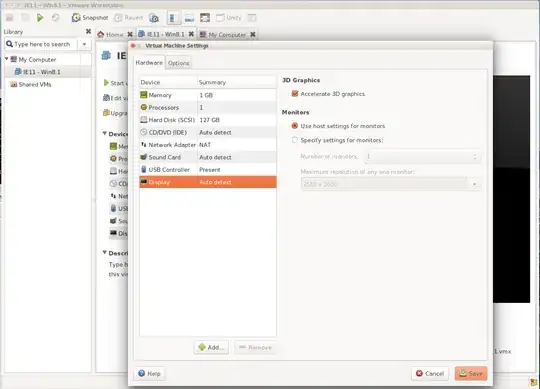
Screenshot

But while booting the VM, it says "No 3D support is available from the host".
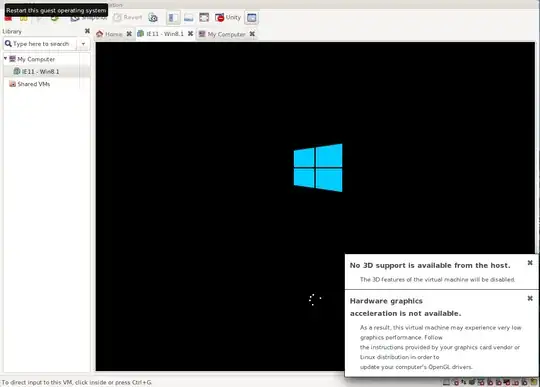
Screenshot

How comes VMware does not detect HW 3D acceleration? How can I fix this?

Thanks!

MadMike
  • 4,275
  • 8
  • 30
  • 50
Siemen
  • 693
  • You will need to enable 3D support in VMware: https://www.vmware.com/support/ws55/doc/ws_vidsound_d3d_enabling_vm.html – MadMike Oct 16 '14 at 16:56
  • @madmike, I think I did this correctly -- see the first screenshot. But thanks for the in-depth link! – Siemen Oct 17 '14 at 08:19

3 Answers3

91

Edit the file ~/.vmware/preferences and look for a line that starts with mks.gl.allowBlacklistedDrivers, if it is not present - you can add it into the file.

This should be changed to mks.gl.allowBlacklistedDrivers = "TRUE" (note the double quotes around TRUE)

Charles Green
  • 21,909
18

Add mks.gl.allowBlacklistedDrivers = "TRUE" in the .vmx file.

It has worked for Linux Mint Cinnamon as host with kernel 3.16 and Debian 8.2 Cinnamon as guest.

  • +1 for likely relevant answer. While this forum post in 2013 seems to agree, this Ask Ubuntu post indicates it is not always the case. This depends on video driver support too. –  Dec 04 '15 at 04:09
  • I didn't have a Preferences file so I modified the VMX on Workstation 12. Worked like a charm. – Drewdin May 05 '16 at 02:00
  • Note for those migrating XP guests from VirtualBox to VMWare Workstation 12 Player Linux 64-bit following a Sysprep process - adding this option to my .vmx file fixed an issue where the mouse pointer was stuck in a single place on the screen and couldn't move. After adding this line the mouse was working again. – Pabru Jun 04 '16 at 00:22
0

If you are using dual graphics cards, the warning implies that the independent graphics card is not available for VMware. Setting mks.gl.allowBlacklistedDrivers indeed solves the problem, but a better way to solve this is to run VMware via:

optirun /usr/bin/vmware

Or, for convenience, you can change your .desktop file and use /usr/bin/optirun /usr/bin/vmware %U as the command.

This solution provides better performance.

See https://www.tiger2doudou.com/doku.php?id=linux:tools:virtualize:vmware_3d_hw_acceleration_with_bumblebee