0

Here is a screenshot
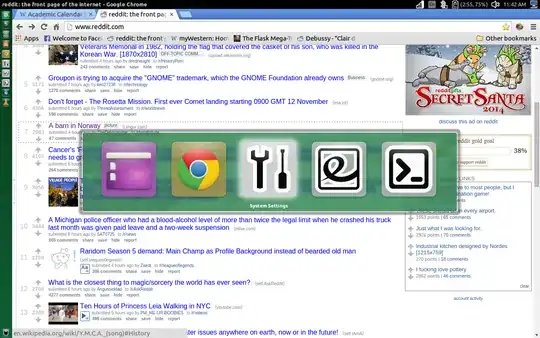
I have no idea how to disable this menu from popping up. I have no idea what it's even called. It pops up frequently and it is ruining my life.

Thanks for your help!

astrob0t
  • 1,766
boop
  • 63

2 Answers2

0

this happens when you press Alt + Tab. If you don't press them, then it won't show up anymore.

IceTimux
  • 149
0

Go to > System Setting > and then Keyboard > then click Shortcuts and inside keyboard shortcuts click Navigation then down the list a little bit is Switch Application click on the ALT + F2 and hit BACKSPACE. That will clear the shortcut for application switcher and it should not longer bother you.

  • Thanks for your answer. It is still doing it though. I'm using a MBpro with a touchpad and the popup menu just randomly appears. And by random I legitimately mean it appears random. I cannot recreate it, but I think if through some combination of my fingers/shirt/whatever, the menu is triggered through the touchpad. – boop Nov 12 '14 at 19:21
  • I done a little bit of research and found out that there is multi touch gestures on touchpads for ubuntu. I found a wiki here https://wiki.ubuntu.com/Multitouch , I will do some more research to see If I can find a solution to disabling this App Switch Gesture for you. – Brandd Newman Nov 12 '14 at 19:44