The /usr/share/applications consist of .desktop files which are owned by root.
Eg :- For gedit, the default text editor.
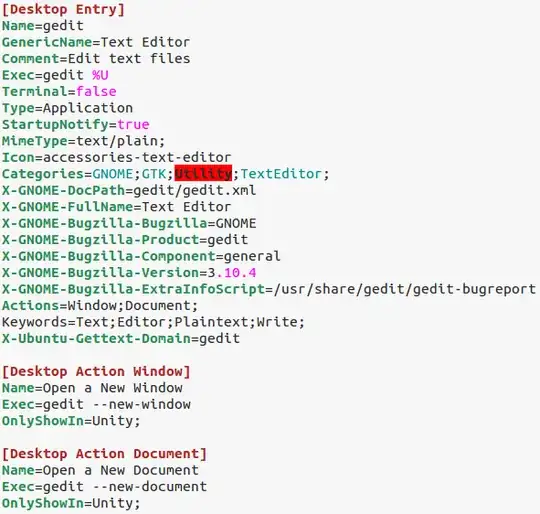
Here, the Icon field shows the name of the .png or .svg file present in /usr/share/icons
Therefore, to change the application icon, you can either edit the .desktop file in /usr/share/applications to point to a new image by specifying its path or replace the .png or .svg file in /usr/share/icons with the icon image you wish to see.
Once you have done either of the above steps, refresh the icon cache using the command
gtk-update-icon-cache /usr/share/icons/<name of icon theme>
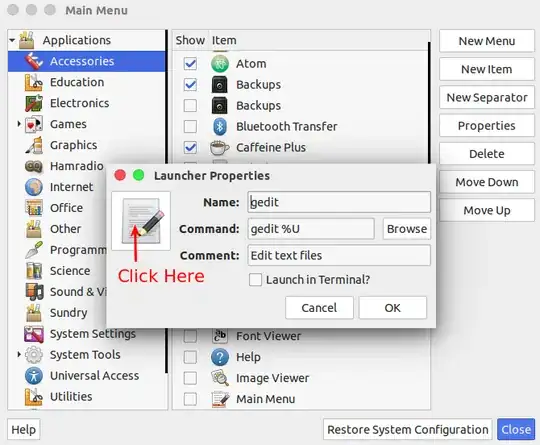
Alternatively, it is easier to use Main Menu or alacarte -
- Install Main Menu (package name is alacarte) alacarte

- Open Main Menu (alacarte)
- Click on a program and select Properties in the right menu.
- Click on the icon
- Browse for your new icon and click Open
- Close your programs properties
- Close Main Menu
You do not need to reboot to see the changes.
.desktopfile(s) 2) what was the application? 3) Did you edit it withsudoor as root? In the last case it would make sense. 3) An application has no other icon than the one defined in the .desktop file. Is there a possible duplicate .desktop file? 4) Could you paste the.desktopfile or at least theIcon=line? – Jacob Vlijm Nov 24 '14 at 20:34