6

I have tried various combinations of gedit, &, >/dev/null 2>/dev/null. When gedit is used with the other two it always prints something to the terminal.
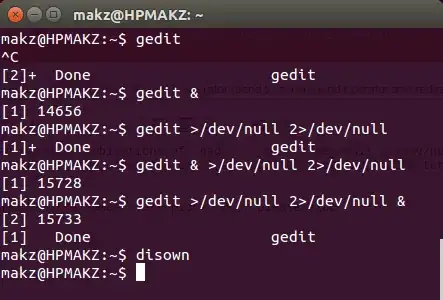
gedit in Terminal

I understand that the numbers are pid's. But, please elucidate the following

  • Why are those outputs produced when I redirected stdout and stderr to /dev/null, whereas bare gedit does print nothing?
  • What does [1]+ Done mean?
  • How to prevent those outputs?
muru
  • 207,970
MAKZ
  • 455
  • 1
  • 4
  • 14

1 Answers1

8
$ sleep 10 &
[1] 24446
$ 
[1]+  Done                    sleep 10

The [1] 24446 and [1]+ Done ... are printed by the shell. From man bash:

When  bash starts a job asynchronously (in the background), it prints a
line that looks like:

      [1] 25647

You can disable the Done output by disabling monitor mode:

set +m

You cannot disable the first form in an interactive shell, however. Instead, try running in a subshell:

$ (gedit &> /dev/null &)
$ 

if you use this, the background process is no longer under job control of the shell.

One a side note, &> can be used to redirect both stdout and stderr together.

David Foerster
  • 36,900
  • 56
  • 98
  • 152
muru
  • 207,970
  • Yes, set +m and then putting gedit &> /dev/null & inside () solved the issue. Can you please elaborate what is () operator, what its impacts are, and when to use it? I may need to accept your answer – MAKZ Feb 26 '15 at 13:14
  • 1
    @MAKZ Like I said, it starts a subshell. The implications of a subshell might be a bit too much for this answer. I suggest you read http://mywiki.wooledge.org/SubShell, and ask a question if you have trouble understanding it. – muru Feb 26 '15 at 13:18