15

I have found that if you go View > Fullscreen:
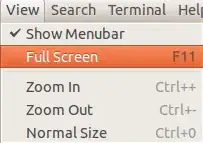
View > Fullscreen Menu

Then it makes the Terminal fullscreen, and to exit fullscreen I have found that I have to execute the command:

exit

But that closes my entire Terminal, is there not a way to get it to exit the full screen without having to close the actual Terminal session?

muru
  • 207,970

4 Answers4

31

Yes, there is a very easy way. Just press F11.

heemayl
  • 94,145
  • 2
    Oh... Now I feel really silly! :D –  Apr 05 '15 at 19:25
  • 8
    @Toroidal: Please don't be..you are not alone..we all sometimes search for some tougher solutions while the actual one is really easy..happens to me all the time :) – heemayl Apr 05 '15 at 19:28
3

Just press F11. If it does not work, press Fn+F11

GNK
  • 2,989
1

Alternative : right click on the screen, select "Leave fullscreen". Or select "Show menu bar". Uncheck Full Screen.

1
  • F11 : Toogle Fullscreen

  • Ctrl + D : exit command shortcut