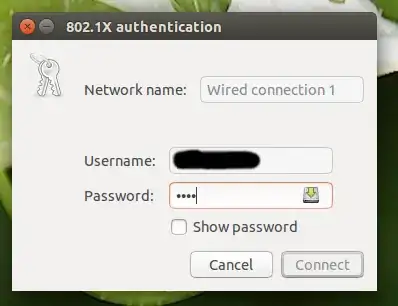
Since I upgraded to 15.04 I can't connect to our office wired network anymore since I can't press connect in the authentication dialog.
Asked
Active
Viewed 4,450 times
0
2 Answers
3
Came across this issue as well on 15.04. Same symptoms and errors as OP but killing/re-starting the nm-applet wouldn't fix anything.
The solution for me was to edit the configuration file for my network interface located at
/etc/NetworkManager/system-connections/Wired\ connection\ 1
I added the relevant parts of my 802.1x settings in the file and it allowed me to connect. So, something like this:
[802-1x]
eap=peap;
identity=username
phase2-auth=mschapv2
1
To try to solve my issue I removed the 802.1x security in the connection settings. When I then added it back I was able to save the password in the settings. That got it working.
hiflyer
- 33
- 1
- 6
killall nm-applet, startnm-appletfrom a terminal and report the output you get when reproducing. There is bound to be an error. – Rinzwind Apr 28 '15 at 12:18