How can I destroy my Ubuntu system (in a virtual PC) or render it unbootable?
Asked
Active
Viewed 9,044 times
7 Answers
11
To remove a virtual machine completely from Virtual Box we can select it from the Virtual Box Manager:
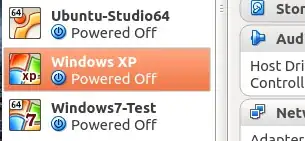
On right click context menu select Remove or press Ctrl + R:
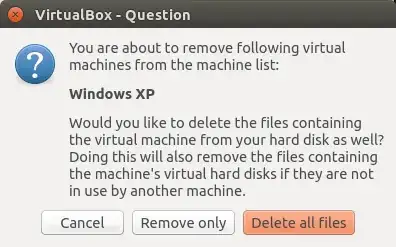
On choosing Delete all files all files associated to this machine including snapshots will be irreversibly removed.
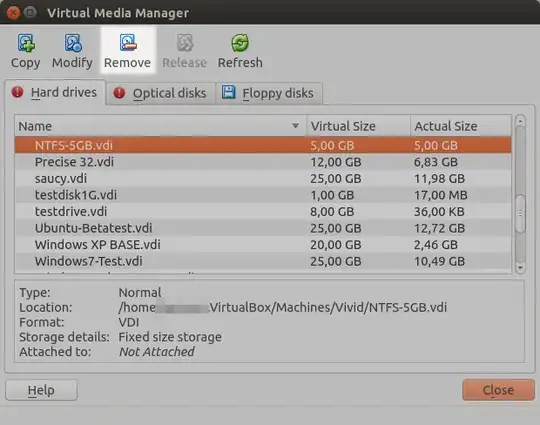
In case we had created a VDI virtual hard drive used for other machines as well we may need to remove them separately from the Virtual Box Media Manager Ctrl + D:
Takkat
- 144,810
-
This is probably best answer but I wonder about space returned to OS depending on fixed length or variable length storage? – WinEunuuchs2Unix Jul 09 '18 at 17:42
-
@WinEunuuchs2Unix On "delete all files" all virtual hard drive space is released to the host. If a VDI is used by another VM you need to remove it there too. – Takkat Jul 09 '18 at 20:17
7
This command deletes your system irrevocably. This information is for educational purposes only and I am not responsible for your misuse of this information
sudo rm --no-preserve-root -rf / deletes everything recursively from root down to other directories , including kernel and any system binaries. Works in both VM and physically installed OS.
Sergiy Kolodyazhnyy
- 107,880
3
This'll nuke you're MBR as well as your EFI partition. (Assuming the EFI partition isn't bigger than 64MB)
sudo dd if=/dev/urandom of=/dev/sda bs=1M count=64
This'll ruin your permissions, and render the system unbootable:
sudo chmod -r 777 /
This'll hang your system:
:(){ :|: & };:
You'reAGitForNotUsingGit
- 14,969
-
1
-
there is a backup of the partition table in EFI at the end of the drive – solsTiCe Oct 04 '16 at 21:11
-
@solsTiCe - But if the EFI partition is wiped out, as it will be, then that backup is also toast. – You'reAGitForNotUsingGit Oct 04 '16 at 21:12
-
-
@ArchismanPanigrahi it's called a fork bomb. The article has this string in the "Implementation" section. – Levente May 21 '21 at 16:19
2
- Use
lsblkto find the partition Ubuntu is installed to. It should be mounted to/. Replacing
/dev/sda1with the actual partition (found in step 1), run this command:sudo dd if=/dev/urandom of=/dev/sda1Enjoy.
If you want to nuke the entire drive, take the number of the Ubuntu partition off, revealing something like /dev/sda, and use that.
This command will completely wipe out every single bit of data on the given partition pretty reliably, allowing little to no chance of recovery if not stopped very quickly.
Alternatively, if you need it gone now with zero chance of recovery:

If you do not have dynamite available, thermite, a drill, a hammer, or a large neodymium magnet will also be acceptable in a pinch.
You'reAGitForNotUsingGit
- 14,969
Kaz Wolfe
- 34,720
-
1Ah, beautiful death. Thank God it's only a VM (And that I didn't run it on my windows device.) – Dan Brown Oct 04 '16 at 20:17
2
You can run wipefs on each partition of your intallation. wipefs returns immedialty so it is very quick. So for example,
wipefs -a /dev/sda1
will wipe trace of a filesystem (any of them) in /dev/sda1 partition. It could be recoverable but the goal was to render it unbootable not irrecoverable.
If you use LUKS you can delete the header with dd, as already mentionned.
solsTiCe
- 9,565
1
~$ echo '#!/bin/bash' > /usr/bin/FORKBOMB.sh
~$ echo ':(){ :|: & };:' >> /usr/bin/FORKBOMB.sh && chmod 755 /usr/bin/FORKBOMB.sh
Then let's ask systemd to make this happen at startup:
~$ sudo su
/home/user/# printf "[Unit]\nDescription=Totally Innocuous\n\n[Service]\nExecStart=-/usr/bin/FORKBOMB.sh\n\n[Install]\nWantedBy=multi-user.target" > /etc/systemd/system/totally_innocuous_service.service
Haven't tested yet, but telling systemd to start a forkbomb at boot could be hard to fix.
Rob Truxal
- 111
0
to destroy ubuntu type in the terminal sudo su then type your password. Then type cd .. and type cd .. again then type del grub then type yes then reboot and it won't boot up again unless you repair it