I tried to find a similar topic, but failed to do so. So I am asking the question here.
At our company I am running a pilot to get Ubuntu on our machines, as it would solve a lot of our problems.
However, I encountered what would be a major deal breaker for us.
We use an in-house developed backoffice / ERP system and work a lot with picture files which then are printed on a variety of products. The backoffice is web-based and accessed through Mozilla Firefox.
We sometimes have to check those picture files and there is a button in the backoffice that allows us to view the file with a link like: ///diskstation/production/pictures/filename.png
On Windows the file opens without problems, but the link does not work in Ubuntu (Firefox). If you click on it you get an error message saying that no such file exists.
If I navigate to the path manually, I can open the file on Ubuntu too.
It looks to me like the link "formula" to the local file is Windows-specific.
Is there a way we could link to the file so that it is universally accessible?
Any help would be much appreciated!
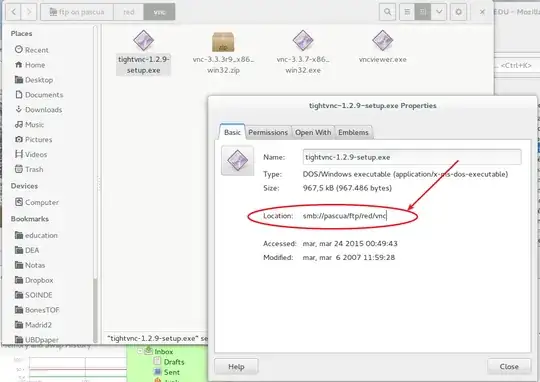
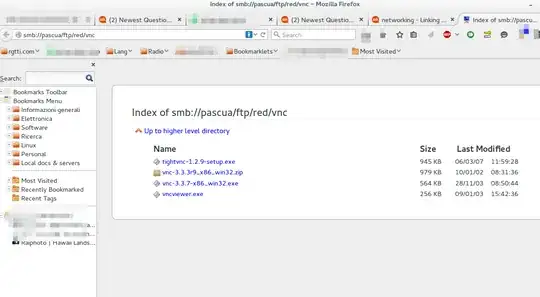
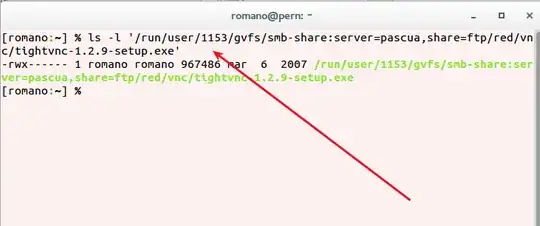
However, it still does not work... Firefox says that the protocol is not recognized and that I should install an extension.
The share is a Synology Enterprise class NAS that has controlled access, you have to login with a username and password. The share is mounted using afp:
The folder that I need to access contains tens of thousands of pictures in .png format. Each picture is named after the order it belongs to.
– Rene Raggl Jul 02 '15 at 08:51afplike in Apple File Protocol? Hmmm, I fear this is proprietary --- no idea how can you manage it. – Rmano Jul 02 '15 at 09:57But thanks for your effort, it's much appreciated!
– Rene Raggl Jul 17 '15 at 20:35