17

I've just seen the following ASCII art.

          0000_____________0000________0000000000000000__000000000000000000+
        00000000_________00000000______000000000000000__0000000000000000000+
       000____000_______000____000_____000_______0000__00______0+
      000______000_____000______000_____________0000___00______0+
     0000______0000___0000______0000___________0000_____0_____0+
     0000______0000___0000______0000__________0000___________0+
     0000______0000___0000______0000_________000___0000000000+
     0000______0000___0000______0000________0000+
      000______000_____000______000________0000+
       000____000_______000____000_______00000+
        00000000_________00000000_______0000000+
          0000_____________0000________000000007

I have a bash script that I would like to print this from. How can I do that?

This is something I might want to redistribute so to keep things simple, I'd prefer if answers didn't require additional things to be installed.

karel
  • 122,695
  • 134
  • 305
  • 337
Ravan
  • 9,587
  • 2
    I don't think anything in the question is unreasonable if you look at it the right way. It's essentially "How do I print this string in Bash?". Once you accept that, installing things that only approximate the desired outcome does seem rather silly. – Oli Oct 28 '15 at 10:55

7 Answers7

23

This is the shortest form I was able to produce, that prints exactly that 007 string:

base64 -d <<<"H4sIAJM2MVYAA1NQgAEDIIhHBsgCBmgAU8TAQJsL2SgU41AFiDALYRhUF8I0NAEUCbBZUB7MBGRrUXX
g8DC6CagORwkYtDCDcw3IMwDdOBL1IyRRwpBI7cihTlSYkRRNUHcRnUZgXIQGIlOoOQC/4ufk0gIAAA==" | gunzip
chaos
  • 28,256
  • 1
    Nice should of though of compression :) I guess its possible to compress other things with something like echo string | gzip -cf | base64? – Wilf Oct 28 '15 at 22:26
  • 2
    @Wilf Just: echo string | gzip | base64 and yes the base64 is just that we have only alphanumeric characters .Btw gzip is very effective in compressing text, as you can see. – chaos Oct 28 '15 at 22:30
  • this is by far the best solution! – captainblack Feb 24 '19 at 23:26
  • Note OSX base64 doesn't have the -d option, instead you must use -D – spuder Mar 05 '20 at 21:46
  • For those who don't know how to paste multi-line in terminal. paste it in a file then: cat your_ascii_art.txt | gzip | base64 – Pezhvak Jan 22 '22 at 15:32
16

What about just echo?:

echo -e "              0000_____________0000________0000000000000000__000000000000000000+\n            00000000_________00000000______000000000000000__0000000000000000000+\n           000____000_______000____000_____000_______0000__00______0+\n          000______000_____000______000_____________0000___00______0+\n         0000______0000___0000______0000___________0000_____0_____0+\n         0000______0000___0000______0000__________0000___________0+\n         0000______0000___0000______0000_________000___0000000000+\n         0000______0000___0000______0000________0000+\n          000______000_____000______000________0000+\n           000____000_______000____000_______00000+\n            00000000_________00000000_______0000000+\n              0000_____________0000________000000007;"

Every newline has been replaced with \n to shove it all into one line
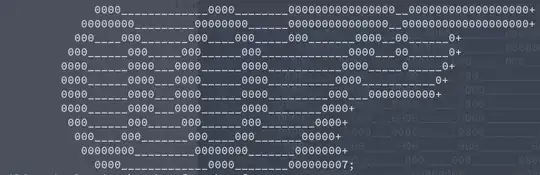
enter image description here

It won't resize to the terminal though etc (unless you check the terminal width and echo one that is the right size), and it isn't that short either (is there a way to repeat characters better?) but it should work. If you want the colours as well you can use escape codes:

echo -e "\033[31m           0000\033[0m_____________0000________0000000000000000__000000000000000000+\n\033[31m         00000000\033[0m_________00000000______000000000000000__0000000000000000000+\n\033[31m        000\033[0m____000_______000____000_____000_______0000__00______0+\n\033[31m       000\033[0m______000_____000______000_____________0000___00______0+\n\033[31m      0000\033[0m______0000___0000______0000___________0000_____0_____0+\n\033[31m      0000\033[0m______0000___0000______0000__________0000___________0+\n\033[31m      0000\033[0m______0000___0000______0000_________000___0000000000+\n\033[31m      0000\033[0m______0000___0000______0000________0000+\n\033[31m       000\033[0m______000_____000______000________0000+\n\033[31m        000\033[0m____000_______000____000_______00000+\n\033[31m         00000000\033[0m_________00000000_______0000000+\n\033[31m           0000\033[0m_____________0000________000000007;"
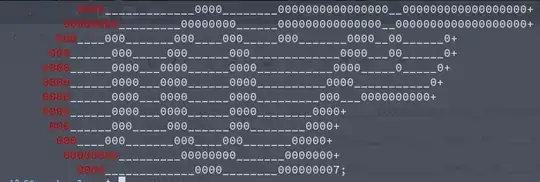
enter image description here

By the way you may want to consider copyright and boring stuff depending onhow you are using it - e.g. this version which is similar seems to still be in copyright.

Wilf
  • 30,832
15

Put the characters in a file and cat it.

cat 007.txt

Use a "here document"

cat <<EOF
      0000_____________0000________0000000000000000__000000000000000000+
    00000000_________00000000______000000000000000__0000000000000000000+
    . . .
EOF

echo a string with embedded newlines

echo '          0000_____________0000________0000000000000000__000000000000000000+
    00000000_________00000000______000000000000000__0000000000000000000+
    . . .'

The advantage of these approaches is that the art is still readable.

12

Shamefully borrowing ( aka stealing ) B.Roland's answer , I suggest a package with a colorfull name . . . toilet ! Which you can get with sudo apt-get install toilet and it works roughly like this:

xieerqi:$ toilet 007

  mmmm   mmmm  mmmmmm
 m"  "m m"  "m     #"
 #  m # #  m #    m" 
 #    # #    #   m"  
  #mm#   #mm#   m" 

It also supports changing fonts ( located in /usr/share/figlet )

 toilet -f bigascii12  LINUX                                                                                 


 ##         ######   ###   ##  ##    ##  ##    ## 
 ##         ######   ###   ##  ##    ##  :##  ##: 
 ##           ##     ###:  ##  ##    ##   ##  ##  
 ##           ##     ####  ##  ##    ##   :####:  
 ##           ##     ##:#: ##  ##    ##    ####   
 ##           ##     ## ## ##  ##    ##    :##:   
 ##           ##     ## ## ##  ##    ##    :##:   
 ##           ##     ## :#:##  ##    ##    ####   
 ##           ##     ##  ####  ##    ##   :####:  
 ##           ##     ##  :###  ##    ##   ##::##  
 ########   ######   ##   ###  :######:  :##  ##: 
 ########   ######   ##   ###   :####:   ##    ## 
6

Install banner package and create a bash script

sudo apt-get install sysvbanner

check below example of command

banner 007
Ravan
  • 9,587
PKumar
  • 3,202
6

Usage

cat << "EOF" 
your_ascii_art 
EOF

See the below example

 cat << "EOF"

      0000_____________0000________0000000000000000__000000000000000000+
    00000000_________00000000______000000000000000__0000000000000000000+
   000____000_______000____000_____000_______0000__00______0+
  000______000_____000______000_____________0000___00______0+
 0000______0000___0000______0000___________0000_____0_____0+
 0000______0000___0000______0000__________0000___________0+
 0000______0000___0000______0000_________000___0000000000+
 0000______0000___0000______0000________0000+
  000______000_____000______000________0000+
   000____000_______000____000_______00000+
    00000000_________00000000_______0000000+
      0000_____________0000________000000007

EOF

Given below some ascii art generator sites.

  1. http://patorjk.com/software/taag/
  2. http://www.network-science.de/ascii/
  3. http://www.glassgiant.com/ascii/
  4. http://www.kammerl.de/ascii/AsciiSignature.php
  5. http://picascii.com/
1

The simplest way of doing this would be to just put the art into a file and then echo it. That way it preserves the original representation in the file, so you can identify it easily!

echo '         0000_____________0000________0000000000000000__000000000000000000+
        00000000_________00000000______000000000000000__0000000000000000000+   
       000____000_______000____000_____000_______0000__00______0+           
      000______000_____000______000_____________0000___00______0+           
     0000______0000___0000______0000___________0000_____0_____0+            
     0000______0000___0000______0000__________0000___________0+             
     0000______0000___0000______0000_________000___0000000000+              
     0000______0000___0000______0000________0000+                           
      000______000_____000______000________0000+                            
       000____000_______000____000_______00000+                             
        00000000_________00000000_______0000000+                            
          0000_____________0000________000000007'
Ravan
  • 9,587