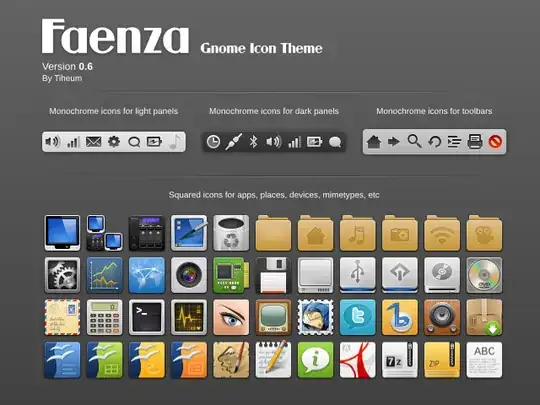
I've noticed screenshots of 10.10 with these rather cooler looking square icons. However when I upgraded my machines I didn't receive and icon upgrade. Is this because it wasn't a fresh install and is retaining old style data - or is this a custom addition?
Asked
Active
Viewed 675 times
2 Answers
6
You're not missing anything. These icons are not the new default, but a new third party theme, the Faenza icon theme. You can grab them from GNOME-Look or the Equinox PPA.
sudo add-apt-repository ppa:tiheum/equinox

sudo apt-get update && sudo apt-get install faenza-icon-theme
andrewsomething
- 37,712
0
I usually manually install the Faenza theme (in fact, it might be even faster then adding all the repositories etc.), because it makes it easier to
- modify the theme: for example, the author has recently changed the chromium browser icon to a new uglier one (some may like it better, though), also, some other icons look ugly in systray (because they are colored and do not fit the rest of the theme -- I have them changed)
- add icons
- or even combine themes (for example, another excellent theme is UBO but you may want keep tray icons from Faenza)
- recover all the changes you made whenever you need to reinstall the system or upgrade it etc.
...also, I am usually just curious what's inside...
So make a folder, for example, ~/Themes/Icons. Go to gnome-look.org, in the left menu click All, then click Highest Rated: you will see the first top rated thing among all stuff they have is the Faenza Icon theme version 0.9.2 (the latest version).
Download it, unpack, you will see four folders inside for 4 different flavours of systray icons (light, dark, darker, darkest). Each folder is an icon theme: it contains index.theme which describes all subfolders with icons.
To install one of these 4 themes just compress the corresponding folder (right click on it -- there should be the option to compress), then open Appearance and move with the mouse your archive to the Appearance window, that is it.
But now you have all the freedom to do whatever you want with the theme, add/modify icons, combine themes, etc. More importantly, whenever you reinstall (or upgrade) the system, all the changes you made will be waiting for you right there, so that you will be back with your favorite icon theme in a minute.
Vadim
- 1,388