I have my desktop computer configured with a static IP address:
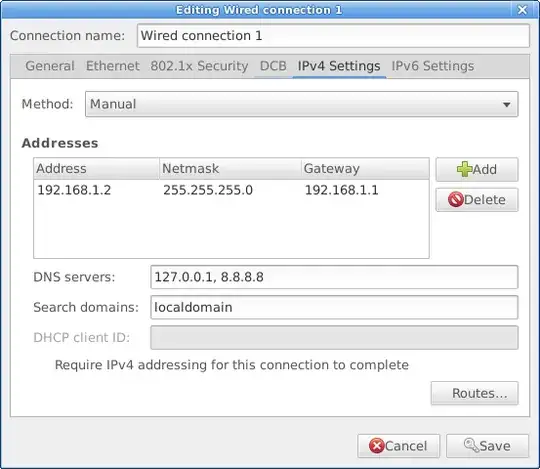
However, /etc/resolve.conf keeps getting overwritten with:
nameserver 127.0.0.1
search localdomain example.com
This seems to happen periodically or when I run sudo resolvconf -u.
I would really like to get example.com removed from the dns search domain list. I used to have it in there but its causing problems now. I just can't seem to get it out. I don't know where it is coming from or why it keeps getting put back. As far as I can grep, there is nothing referring to example.com anywhere in my /etc directory anymore.
What is putting this search domain into my resolv.conf file and how can I prevent it from doing so?
sudo grep -rn example.com /etc/network/interfaces /etc/NetworkManager/system-connections /etc/resolvconf/? – heemayl Apr 08 '16 at 18:42example.comis not found in any of those locations. – Stephen Ostermiller Apr 08 '16 at 18:47dnsmasqlocally so that I can hardcode names for the machines on the local network and share them with my laptop. – Stephen Ostermiller Apr 08 '16 at 18:54resolveconf -uit doesn't add anything to the syslog that I have been able to find, nor do I know of any other log files that it might use. – Stephen Ostermiller Apr 08 '16 at 19:07/run/resolvconf/interface/NetworkManagerhas a line in it with the incorrect information. Should I be editing that file to remove it, or do I need to reconfigure the settings for NetworkManager elsewhere? – Stephen Ostermiller Apr 14 '16 at 10:48nmcli --terse connection show <nmconnection>includes what's in the.nmconnectionfile plus what comes back from the DHCP server. – Samuel Harmer Feb 07 '20 at 09:31