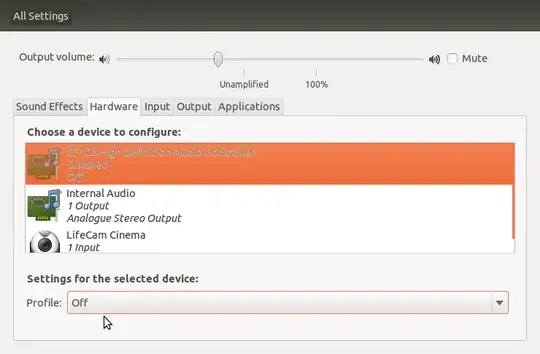
powertop reports that Intel CougarPoint HDMI is 100% active and there are reports that this device consumes a lot of power. If that is so, I would like to disable it as I never use it. Is there a way I can disable it?
I am using Ubuntu 11.10
powertop reports that Intel CougarPoint HDMI is 100% active and there are reports that this device consumes a lot of power. If that is so, I would like to disable it as I never use it. Is there a way I can disable it?
I am using Ubuntu 11.10
I had the same issue when I updated to Ubuntu 19.10.
If it's not install, you can install the PulseAudio control panel using:
sudo apt install pavucontrol
/etc/pulse/default.pa and comment out load-module module-switch-on-port-available line. Save file. Reload pulseaudio using pulseaudio -k.
– charith.arumapperuma
Jul 07 '21 at 08:35
Pavucontrol
– lacostenycoder
Jun 24 '22 at 14:18
Off mode in pavucontrol lives it's own life and is not persistent.
Using load-module module-switch-on-port-available in /etc/pulse/default.pa does not look like a desired solution.
Sudo Edit: /etc/modprobe.d/blacklist.conf
Add: blacklist snd_hda_codec_hdmi
Run: pulseaudio -k to restart pulseaudio.
Downside: even with it blacklisted it re-appear if it is on a device that is attached after boot. E.g: I have 6 monitors where one have HDMI-audio. If I de-activate the HDMI monitor and then activate it the HDMI-audio for it is activated. Have not investigate why.
snd_hda_codec_hdmi i'm interested in disable a digital output, not hdmi
– Arnold Roa
Apr 02 '22 at 10:52
lsmod. Not sure what you have to look for for digital output (SPDIF?).
– user3342816
Apr 04 '22 at 18:52
To disable the audio device (not just mute) run in terminal
sudo alsa force-unload
alsa options are
unload|reload|force-unload|force-reload|suspend|resume
In case you require the audio device at a later stage.