22

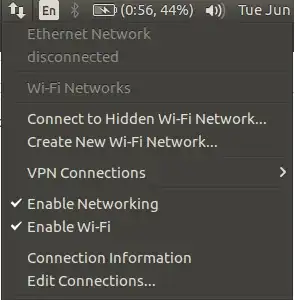
I am connected to a WiFi network but wired connection icon is shown:

Screen-shot of the problem:
image

I also can't see other available WiFi networks in order to connect to them.

Output for lspci -knn | grep Net -A2:

0c:00.0 Network controller [0280]: Broadcom Corporation BCM4312 802.11b/g LP-PHY [14e4:4315] (rev 01)
    Subsystem: Dell Wireless 1397 WLAN Mini-Card [1028:000c]
    Kernel driver in use: wl

What should I do?

  • 2
    +1 very strange indeed. And I also notice it doesn't show you the list of SSIDs... – You'reAGitForNotUsingGit Jun 21 '16 at 17:12
  • Also when I disable then re-enable wifi, it shows the wifi icon trying to connect to the saved network. But when it's connected, wired network connection is shown. – arman_aegit Jun 21 '16 at 17:17
  • What WiFi hardware do you have ? You can check with lspci -knn | grep Net -A2. – Jonas Czech Jun 21 '16 at 17:29
  • @JonasCz: I added the output to the question. – arman_aegit Jun 21 '16 at 17:40
  • Do you have the Broadcom drivers enabled in the "Additional drivers" utility ? – Jonas Czech Jun 21 '16 at 17:42
  • Yes, they are enabled. – arman_aegit Jun 21 '16 at 17:59
  • @arman_aegit Could you add output of ifconfig -a , more /etc/network/interfaces /etc/network/interfaces.d/* /etc/NetworkManager/conf.d/* /etc/NetworkManager/NetworkManager.conf – user.dz Jun 21 '16 at 18:48
  • 2
    Bug persists in ubuntu 16.10. After suspend, network manager thinks I'm connected via wire. However, if I go to system-settings -> network I can see the list of nearby SSIDs and confirm the fact that I'm connected to the correct network. – Eric Oct 23 '16 at 13:32
  • This issue persists for me in 16.04 after a suspend... I was just getting comfortable using suspend again, and now I'm hesitant; this kind of quirky behavior is what turned me off to suspend years ago -- in fact, I almost always encounter issues when I use suspend or hibernate on Windows, so I prohibit its use on those system where I'm concerned. – nicorellius Feb 18 '17 at 21:43

2 Answers2

21

This is caused by a bug in Network Manager. It seems that when wlan0 is renamed using the new naming scheme it confuses Network Manager and Network Manager thinks you have another ethernet connection.

It can normally be fixed with

systemctl restart NetworkManager.service
The command will have to be done after a reboot or suspend until the fixes are released
Jeremy31
  • 13,388
0

I changed my WiFi driver to rtlwifi_new, and it seems to have solved the issue. I get the normal WiFi icon when I suspend my computer now. Thank goodness!

Seth
  • 59,442
  • 44
  • 149
  • 201
New2Coding
  • 503
  • 1
  • 5
  • 17
  • What OS are you using @UnityLauncherProblems ? I'm curious about using this driver, but would be hesitant unless I knew more about it. I found it on GitHub (https://github.com/lwfinger/rtlwifi_new), but otherwise am not sure about its use... – nicorellius Feb 18 '17 at 21:47
  • can you add the steps of changing the wifi driver please? – 842Mono Oct 08 '17 at 11:34