After recently re-installing, i went through every System Setting and choose exactly how i wanted everthing to be.
Except one thing.
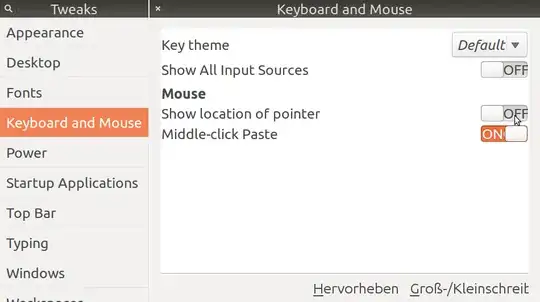
I'd never seen the Show Cursor on CTRL value before, and wanted to know what it was like. After a while it was simply annoying, whenever i paste of cut in chrome it takes the focus off of the text before i can press V.
I have been through eveything in System Settings and can't find it again to disable it.
How do i set CTRL not to pulse around the cursor?
I will be happy with directions in System Settings, Ubuntu Tweak, or GConf.

LANGUAGE=en gnome-tweak-tool. – user.dz May 14 '14 at 09:46