22

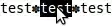
When I double-click to select text in GNOME Terminal, the selection stops at spaces but continues over hyphens:

spaces

hyphens

Some of my filenames contain uncommon characters such as the heavy teardrop-spoked asterisk and are not selectable by double-clicking:

unusual characters

Is there a way to make double-click selection continue over these characters as well?

ændrük
  • 78,726

6 Answers6

21

Yes, GNOME Terminal has a setting word-char-exceptions that controls which punctuation characters are considered to break words for double-click selection.

By default, all punctuation will break words, but characters in the exceptions list are instead considered part of the word.

There used to be a UI for it, but that was removed in gnome-terminal 3.14 (Ubuntu 15.04), so now it can only be set via dconf or dconf-editor.

I like to use #%&+,-./:=?@_~ as the set of non-word-separators.

Script

I put this together into a script to set the word separators:

https://github.com/ab/ubuntu-wart-removal/blob/main/gnome-terminal-word-separators.sh

Download:

wget https://raw.githubusercontent.com/ab/ubuntu-wart-removal/main/gnome-terminal-word-separators.sh

Usage:

# print help
./gnome-terminal-word-separators.sh -h

set word-char-exceptions for all profiles

./gnome-terminal-word-separators.sh --all '#%&+,-./:=?@_~'

set word-char-exceptions for a specific profile

./gnome-terminal-word-separators.sh -p 8741a4c2-15c8-45bb-86ec-34c3080526a7 '#%&+,-./:=?@_~'

dconf-editor

You can also edit this with a GUI using the dconf-editor.

Find your GNOME Terminal profile's UUID:

menu -> Preferences -> select your profile -> find the Profile ID listed in the bottom right

Your UUID might look like b1dcc9dd-5262-4d8d-a863-c897e6d979b9.
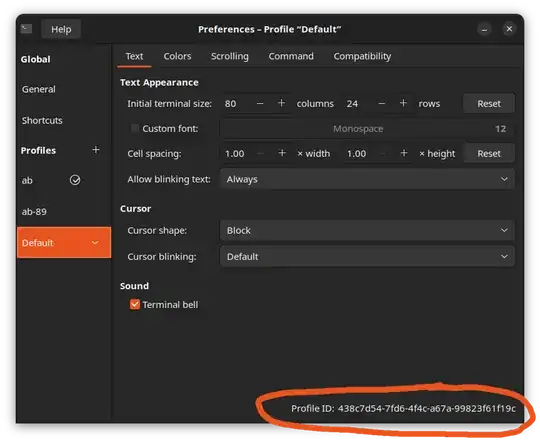
gnome-terminal preferences

Then open dconf-editor.

  • Navigate to /org/gnome/terminal/legacy/profiles:/.
  • Go to your profile's UUID
  • Go to word-char-exceptions
  • Set your custom value (must be surrounded by quotation marks)
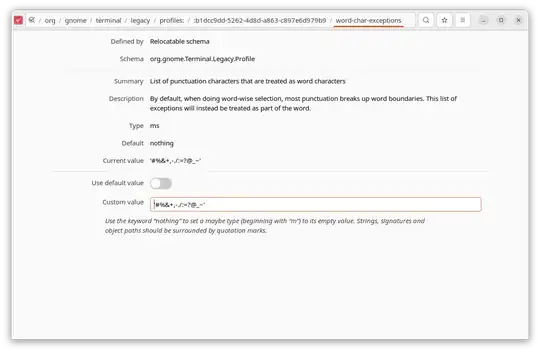
dconf-editor showing word-char-exceptions

History

GNOME Terminal has flip flopped several times on this subject.

There used to be a setting in the preferences GUI to manage this, but that was removed in gnome-terminal 3.14 (included in Ubuntu 15.04 Vivid).

Then in gnome-terminal 3.16 (included in Ubuntu 15.10 Wily), the option was reintroduced under the hood, but with no UI. In addition, colon : was changed to be treated as a word separator (removed from exceptions).

Note: The help text description in dconf-editor of word-char-exceptions was backwards for gnome-terminal versions before 3.51.90. https://gitlab.gnome.org/GNOME/gnome-terminal/-/issues/8054
A B
  • 1,476
  • Thanks this is exactly what I needed in order to get :. Is it possible that you could write the command(s) to automatically fetch the default or current profile so I don't have to manually look up my profile ID in order to run that command in future? That way I can just run that script on fresh installs. – Programster Jun 06 '16 at 13:20
  • @Programster You could do something like this with dconf list /org/gnome/terminal/legacy/profiles:/ – A B Jun 07 '16 at 00:13
  • thanks @alberge I took that and put it in a python script – Programster Jun 08 '16 at 11:18
  • 1
    What is the default value of word-char-exceptions, so I can add just one character? – Tor Klingberg Aug 21 '17 at 14:20
  • 1
    @TorKlingberg Apparently no one knows. You can use the dconf-editor graphical application to browse to that location. All it says is "default", but not what the default value is. – jrw32982 Jan 26 '21 at 20:50
  • Using dconf Editor works for me, but strangely, the Summary of the word-char-exceptions property seems to state that these characters will NOT be considered part of words: "List of ASCII punctuation characters that are not to be treated as part of a word when doing word-wise selection." However, on Ubuntu 22.04.3 LTS, I get the exact opposite behavior, i.e. specifying a value of '_' results in ONLY underscore (and alphanumeric characters) being part of words. Perhaps I just misunderstood the description of this property? – jth Jan 10 '24 at 21:50
  • @jth I think you're right, the dconf schema's description of the property has it backwards. Normally gnome-terminal breaks words on punctuation, but the exceptions WILL be considered part of words. – A B Feb 08 '24 at 17:45
11

In "Edit > Profile Preferences > General", add the character to the "Select-by-word characters" box.

mgunes
  • 9,930
  • Thanks, I don't know how I didn't notice that. – ændrük Oct 20 '10 at 05:10
  • Has anyone found a general way to do this GNOME-wide? Or are word-boundaries up to the developers of each application to define/redefine? Related question: http://superuser.com/q/650240/245597 . – Noyo Sep 26 '13 at 13:19
  • 15
    At least since version 3.14, this option has disappeared. How can we do it now? – Joachim Breitner Nov 06 '14 at 10:20
  • I tried dconf write /org/gnome/terminal/legacy/profiles:/:{your-profile-id}/word-char-exceptions '@ms "-,.;/?%&#_=+@~·:"' but all I get is error: Could not connect: Connection refused – cprn Sep 09 '15 at 16:31
  • Can't seem to get the non-breaking space to work. It does work with the funky asterisk on mate terminal from Zesty however. – Gringo Suave Jun 11 '17 at 01:36
2

Other answers do not work today ... this works on ubuntu 18.04 ... first identify your UUID gnome terminal profile id ... issue this in terminal

profile=$(gsettings get org.gnome.Terminal.ProfilesList default)

echo $profile  #  for me it gives b1dcc9dd-5262-4d8d-a863-c897e6d97969

now make change :

dconf write /org/gnome/terminal/legacy/profiles:/:b1dcc9dd-5262-4d8d-a863-c897e6d97969/word-char-exceptions '@ms "-,.;?%&#_+@~·$/"'

until ubuntu 18.04 gets fixed the following read command silently fails whereas it worked fine on ubuntu 16.04

dconf  read  /org/gnome/terminal/legacy/profiles:/:b1dcc9dd-5262-4d8d-a863-c897e6d979b9/word-char-exceptions
0

At Ubuntu 20.04.5 LTS. I've lost a couple of hours, trying to make it work. But the reason of the stall is quite simple: the meaning of "@ms" variable is inverse to intuitive, and inverse to what they've written in org.gnome.Terminal.gschema.xml.

@ms should contain the only characters, ALLOWED to select by double-click. So, if you DON'T want dashes or colons or smth to select, you may enter:

UUID=$(gsettings get org.gnome.Terminal.ProfilesList default | tr -d \')
dconf write /org/gnome/terminal/legacy/profiles:/:${UUID}/word-char-exceptions "@ms '_^'"

Change works immediately, retains through reset; but for different profile, you should repeat the command.

Jackal
  • 43
  • 5
0

A very useful default feature implemented in other terminals is the progressive selection of extended sections of a line on the screen. e.g., given

/home/username/dir1_r.2-3/dsr.filenr_34.ctr 23456677 dftrprpr

double-clicking on, say, filenr in dsr.filenr_34.ctr would progress from filenr to:

                              filenr_34
                          dsr.filenr_34.ctr
                       -3/dsr.filenr_34.ctr
                      2-3/dsr.filenr_34.ctr
                    r.2-3/dsr.filenr_34.ctr
               dir1_r.2-3/dsr.filenr_34.ctr
      username/dir1_r.2-3/dsr.filenr_34.ctr
 home/username/dir1_r.2-3/dsr.filenr_34.ctr
 home/username/dir1_r.2-3/dsr.filenr_34.ctr 23456677
 home/username/dir1_r.2-3/dsr.filenr_34.ctr 23456677 dftrprpr
/home/username/dir1_r.2-3/dsr.filenr_34.ctr 23456677 dftrprpr

Surrounding symmetries may be solved by adding pairs until next-level delimiter.

And of course the user should be given the option of changing defaults.

ændrük
  • 78,726
marc
  • 9
  • 1
    No comment on the answer but try to format it in a better way so that people understand it faster. If you want to list it step by step, use numbering. – VedVals Dec 13 '12 at 13:53
  • Thank you, but I don't think this applies to my question. I'm specifically asking how to configure GNOME Terminal. – ændrük Dec 13 '12 at 19:14
0

Extending @alberge answer, you can execute the following python3 script to change all your profiles to do this:

#!/usr/bin/python3

import subprocess

command = ["dconf", "list", "/org/gnome/terminal/legacy/profiles:/"]
result = subprocess.run(command, stdout=subprocess.PIPE, stderr=subprocess.PIPE, universal_newlines=True)

profiles = result.stdout.split('\n')

for profileString in profiles:
    if profileString.startswith(":"):
        changeCmdPart = "/org/gnome/terminal/legacy/profiles:/" + profileString + "word-char-exceptions"
        changeCmd = ["dconf", "write", changeCmdPart, '@ms "-#%&+,./:=?@_~"']
        subprocess.run(changeCmd)

print("done!")

Or you can just execute:

curl -s http://scripts.programster.org/scripts/5?output=raw | python3
Programster
  • 6,049