The login prompt appears before the boot process is complete, so you ended up with a screen like this in which the boot messages continue after the Ubuntu Server login prompt:
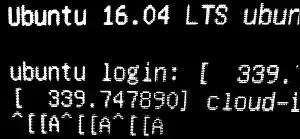
Sometimes when this happens you can wait until the boot messages stop and you get a blinking cursor, and then just press Enter and get a fresh login prompt. If that doesn't work, try to login again from a new virtual console.
Open a virtual console (tty) by using the keyboard shortcut Ctrl+Alt+F3.
At the login: prompt type your username and press Enter.
At the Password: prompt type your user password and press Enter.
If you still can't login, run the command: sudo reboot from the console, and maybe you will get a working login prompt the next time when the Raspberry Pi reboots.


I will upload video in a few minutes to show the problem.
– Nadav t Nov 01 '16 at 16:36