What's the best & easiest GUI software that can join a video that I have downloaded in several parts?
Asked
Active
Viewed 5.0k times
27
-
4That was my first reaction too, but let's give the user the benefit of the doubt. I'm not voting down but I would recommend editing the question body and stick with the technical aspects of it. The source and content of the videos are irrelevant to the question. – lovinglinux Oct 20 '10 at 17:50
6 Answers
18
mkvtoolnix-gui 
Notes:
- there is no re-encoding involved, so
the merging process takes only a
couple of seconds - it can merge other video formats, like avi, mp4, but the output is always mkv
- it can't merge videos with different apect ratios
For more info see the documentation here
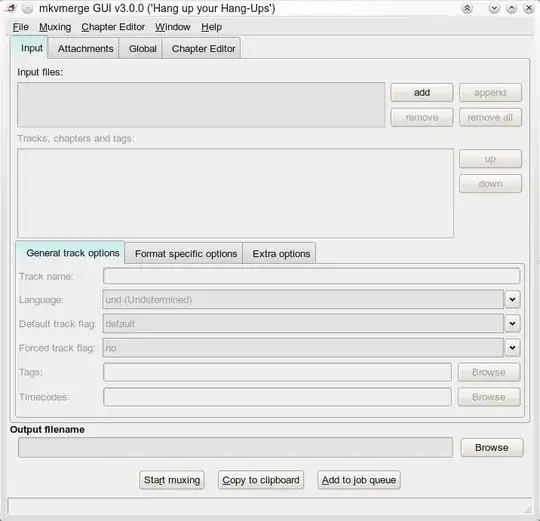
Quick how-to:
Click "add", select the first video, then click "append", then select the other videos to append. You can select multiple videos as long as you select them in order or you can append one by one. Then click "Start muxing". You might want to change the output filename. The other options are not really necessary for basic merging. Nevertheless, you can also add multiples subtitles in various formats or languages and also multiple audio tracks.
tgkprog
- 585
lovinglinux
- 6,427
-
-
-
2You can append different formats like avi, but the output is always mkv. – lovinglinux Oct 20 '10 at 17:46
-
Didn't work for the divx files I tried to join. In this case avimerge was the better option. – Glutanimate Sep 14 '12 at 10:28
-
-
-
Well, for what it is worth, I just firstly converted .mkv to .mp4 and subsequently joined some of the (it is a series called "New Amsterdam") .mp4's into a single video file. So it might still be mkv but a lot of -older- tools (like my samsung tv) will play it as if they are mp4. The software does need a little test, trail and error but works fine and very fast. – Rob Jan 24 '22 at 20:46
8
AVI files - avimerge
Description
avimerge is a versatile tool. It can contatenate several AVI files into one. It can also be used to fix an index of a broken file and can also replace audio tracks or muxes new ones. It can read raw AC3 and MP3 files for multplex- ing.
Installation
sudo apt-get install transcode transcode-utils
Usage
You can merge avi files with:
avimerge -i input1.avi input2.avi -o output.avi
It's encoding-free, so joining the parts usually doesn't take much longer than a minute.
Options
Other available options are:
Usage: avimerge [options]
     -o file                   output file name
     -i file1 [file2 [...]]    input file(s)
     -p file                   multiplex additional audio track from file
     -a num                    select audio track number from input file [0]
     -A num                    select audio track number in output file [next]
     -b n                      handle vbr audio [autodetect]
     -c                        drop video frames in case audio is missing [off]
     -f FILE                   read AVI comments from FILE [off]
     -x FILE                   read AVI index from FILE [off] (see aviindex(1))
Glutanimate
- 21,823
-
2With the input in bash you can specify it like
avimerge -i input{01..10}.avi -o output.avi, or evenavimerge -i input{01,02,03}.avi -o output.aviso you don't have to write it a zillion times - this is very useful as I had a few vids on old filesystems spilt up separate files, thanks +1 ! – Wilf Aug 15 '15 at 23:06 -
1Ubuntu 16.10: transcode-utils is not available, but
sudo apt-get install transcodeis sufficient – user1182474 Jan 02 '17 at 11:41
8
Mencoder
You can use Mencoder (Mplayer's encoded), that I recently found as a very good alternative to avconv.
Installation
sudo apt-get install mencoder
Usage
To merge some AVI files to a single AVI file, just call mencoder with setting "copy" as both video and audio encoder, so that no encoding is done:
mencoder -ovc copy -oac copy video1.avi video2.avi -o mergedvideo.avi
With this you can merge not only AVI videos, but also every format supported by Mencoder (see Selecting codecs and container formats page).
Source: Ubuntu How Tos
-
-
I just tried merging avconv-generated H.264-encoded .mov files using MEncoder. The resulting .mov looked good on Ubuntu but failed to open on a Mac. (avconv did worse; the merged video looked broken on Ubuntu.) – Ulrich Stern Feb 15 '16 at 19:25
-
The MEncoder documentation (http://www.mplayerhq.hu/DOCS/HTML/en/menc-feat-selecting-codec.html) says "Unfortunately, as MEncoder was not designed from the beginning to support container formats other than AVI, your should really be paranoid about the resulting file. Please check to be sure that the audio/video synchronization is OK and that the file can be played correctly by players other than MPlayer." So it seems that this may not work well for formats other than AVI. – Adam Dingle Oct 01 '20 at 12:42
4
GNOME Split :
Very easy to use. Support most used cutting file formats.
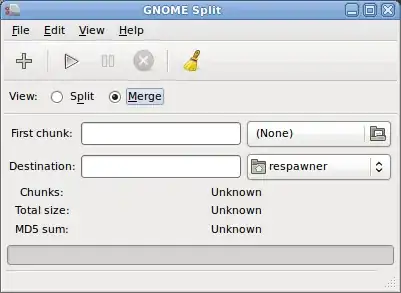
sudo apt-get install gnome-split
Nyamiou The Galeanthrope
- 2,571
-
-
1Looks very raw. Videos have metadata. Merging two proper videos without stripping metadata can easily lead to a corrupt video. – Oli Nov 12 '10 at 14:38
-
Now available in the main repos. http://packages.ubuntu.com/search?suite=all&arch=any&searchon=names&keywords=gnome%20split – Ken Sharp Dec 25 '16 at 03:20
0
openshot video editor The one and only. Import videos edit crop and what not.
and export them to any format you want mp4/flv/mkv/avi etc... etc... etc...
to install run these command in gnome-terminal
wget https://launchpad.net/openshot/1.4/1.4.2/+download/openshot_1.4.2-1_all.deb
sudo dpkg -i openshot_1.4.2-1_all.deb
blade19899
- 27,004
-
2Openshot has "sticky" drag and drop, so dragging the files next to each other on the video timeline will make them completely abut. The only downside of Openshot is that exporting will cause a re-encode, so it's not light on its feet compared to mkvtoolnix-gui. – Josh Jan 08 '14 at 10:14
-1
PiTiVi is included in current versions of Ubuntu. You can add both file parts to it and then arrange them on the timeline. You then export the video to whatever format you want.
brousch
- 2,630
-
5PiTiVi needs to re-encode the video, which is time consuming for a simple merge procedure. – lovinglinux Oct 20 '10 at 17:52