I installed ubuntu in my virtual machine (Oracle Virtual box) and when i try to install VNC Viewer then it shows:
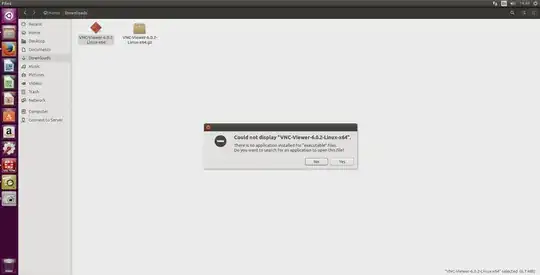
when I try to search no applications are found.I could not figure what is wrong here.Any help is appreciated.
I installed ubuntu in my virtual machine (Oracle Virtual box) and when i try to install VNC Viewer then it shows:
when I try to search no applications are found.I could not figure what is wrong here.Any help is appreciated.
The process involves two steps:
Download the needed files from here or any other location.
Then make file executable with:
chmod +x VNC-Viewer-6.0.2-Linux-x64
Then move it to say your home directory and run it from there, or any other location:
mv VNC-Viewer-6.0.2-Linux-x64 ~/

./VNC-Viewer-6.0.2-Linux-x64
Note: You don't install you just run it.
Source:
There are many VNC clients. Some have the same vncviewer executable. One is TigerVNC which is available in the package manager:
sudo apt install tigervnc-viewer
vncviewer <ip>:<display/port>
See also: Best VNC/remote desktop application?
ls -l VNC-Viewer-6.0.2-Linux-x64– George Udosen Apr 01 '17 at 06:5964 -rw-rw-r-- 1 john john 6723160 Mar 23 16:55 VNC-Viewer-6.0.2-Linux-x64– John Apr 01 '17 at 07:01chmod +x VNC-Viewer-6.0.2-Linux-x64, then try to install – George Udosen Apr 01 '17 at 07:05ls -l VNC-Viewer-6.0.2-Linux-x64again you will now see-rwxrwxr-x 1 george george 6723160 Apr 1 08:02 VNC-Viewer-6.0.2-Linux-x64*, note thexin the result. Meaning the file can now be executed – George Udosen Apr 01 '17 at 07:14