19

I been thinking of anyone could guide me up, that in ubuntu 11.10 with gnome 3,
there is a option ctrl+alt+d to show the desktop by minimizing the current window.

What I was thinking was that if I press ctrl+alt+d it will lead to desktop screen and when I press again ctrl+alt+d to go back to my working window..

As of now it doesnt work in this way ..is there any way out to do that same

Alexandre
  • 1,968
ashish
  • 191

4 Answers4

36

With Gnome Shell (17.10+)

The default keybind is Ctrl + Super + d. The setting is called Hide all normal windows

You can change it in Settings > Keyboard Shortcuts > Navigation:

screenshot

With Unity (before 17.10)

The patch is already released but if you still face that problem use the following:

  • Click your username on the top right of the screen and select System Settings.

  • Under Hardware click Keyboard.

  • Switch to the Shortcuts tab, and click Navigation in the left column. Scroll down and select Hide all normal windows which has a default value of Disabled.

screenshot

Lorenz Keel
  • 9,551
Achu
  • 21,427
  • 1
    In Ubuntu 17.10, the default is now Ctrl+Super+D – leo Jan 25 '18 at 11:54
  • Suggest the Gnome developers using MS Windows' shortcut keys conventions as the default configuration, then more MS Windows users will not have difficulties to move from Windows to Linux. – Clock ZHONG Jun 26 '18 at 02:55
4

In Ubuntu 12.04 beta2 (gnome-shell 3.4) you can press Super-D to show your desktop, and Super-D again to go back to your previous windows.

4

If you want a non-keyboard method, there's also the "Show desktop button" option.

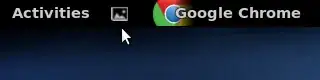
Simply visit this link and click on the on/off slider near the top left corner, you'll be prompted to install the widget, and from then on you'll have a small "show desktop" icon next to "Activities in your menu". (Shown here in between my Activities menu and Google Chrome Indicator)

Gnome Shell Show-Desktop Widget

Very handy, IMHO.

Updated 25/09/2017 with the new extension compatible with the current version of GNOME Shell, as suggested by @stefan-hamke. The out-of-date original is here.

Pablo Bianchi
  • 17,552
John T
  • 425
  • 1
    Whoever reads this and realizes that the linked extension is not compatible anymore with the current version of GNOME shell: There is an updated version available under https://extensions.gnome.org/extension/1194/show-desktop-button/ – Stefan Hamcke Sep 02 '17 at 22:11
  • That extension might be (is?) outdated. See https://askubuntu.com/a/1013739/340383 for instructions on uninstalling the old one and installing a newer one. – bgoodr Mar 11 '18 at 15:46
1

Programmatic/CLI way to set the “Hide all normal windows” shorcut (in my case, to Super + D ), tested working on GNOME 45:

gsettings set org.gnome.desktop.wm.keybindings show-desktop "['<Super>d']"

You can launch this from terminal (Ctrl+Alt+T is default keybinding on Ubuntu) or put this in your set-up shell script.

Kata55
  • 11