8

I installed Ubuntu 11.10 on my Inspiron 9100 a week ago. I have a HP Laser Jet 1100 connected to it. I can print a file from LibreOffice Write. So the printer is working. Now, the question is, How do I print a pdf file (or few pages of a pdf file)?

When I click the pdf file, some package opens the file. I can view the file, but it does not provide any option to print the file.

What am I missing? Thanks in advance.
Jorge Castro
  • 73,907
Bzman2
  • 91
  • 1
  • 1
  • 2

3 Answers3

15

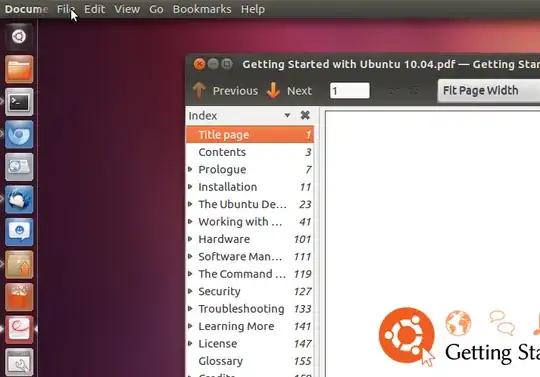
The PDF file should be opening in the Evince document viewer. You need to hover the mouse over the top panel to reveal the menu (AKA global menu).

Global menu location

Under "File" you will find the "Print..." option. Alternatively, press Ctrl+P to access the print dialogue.

pablomme
  • 5,880
2

I opened LibreOffice Writer and then opened the .pdf document in there. Clicked Print and Voila!

MadMike
  • 4,275
  • 8
  • 30
  • 50
ccannon
  • 61
  • I had to do it this way in Ubuntu 16.04.1. Just stopped printing PDFs opened in Document Viewer one day, don't know why. Choose "open with" and select '/usr/bin/libreoffice'. – Andrew Feb 16 '17 at 10:58
2

2012

You can use LibreOffice Draw to open, edit and print PDF files.

In Ubuntu install LibreOffice Extension for Importing PDF Files from the Software Center.

When you go to open the PDF, use Draw, go to file, open, select the PDF you want to open, click All files, (lower right), scroll down to PDF, Click it, then hit open.

(Windows version edits PDF's right out of the box, I think the Linux version defaults to viewing the code).

2023

(EDIT)

Things have changed from 11 years ago. Current Ubuntu LibreOffice Draw versions open, edit and print vector PDF files right out of the box.

Text on Raster PDF's is not editable but LOD can print them okay.

C.S.Cameron
  • 20,590
  • 12
  • 78
  • 126
  • Have you tried this? I've never had this work. When I open PDFs I get dozens of pages of random strange characters. – Tom Brossman Jan 30 '12 at 05:56
  • For LibreOffice for Linux you need to install "LibreOffice Extension for Importing PDF Files", from the Software Center. – C.S.Cameron Jan 31 '12 at 09:50
  • When you go to open the PDF, use Draw, go to file, open, select the PDF you want to open, click All files, (lower right), scroll down to PDF, Click it, then hit open. (Windows version edits PDF's right out of the box, I think the Linux version defaults to viewing the code). – C.S.Cameron Jan 31 '12 at 10:05
  • Wow, that worked! Thanks, I learned something new today. – Tom Brossman Jan 31 '12 at 14:45
  • @C.S.Cameron Can you please combine hints in the comments and edit your answer with some more details? – Archisman Panigrahi Jun 09 '23 at 16:39
  • LibreOffice Extension for Importing PDF Files from the Software Center - nowadays, the software center is snap store, which probably does not have this package. Can you please also add the relevant terminal command? – Archisman Panigrahi Jun 10 '23 at 04:38
  • @Archisman Panigrahi: I think LibreOffice Extension for Importing PDF Files is no longer required. I do not have a physical printer with me but Print to File works okay. What do you mean by terminal command? If you want to edit the answer, I will accept it, within reason. This is one of the first AU answers that I got an upvote on. – C.S.Cameron Jun 10 '23 at 12:13
  • Hi, the answer looks good now. I did not want it to be outdated, hence asked you to edit it :) – Archisman Panigrahi Jun 10 '23 at 15:33