Einleitung

Es ist wichtig, das Navi deines Autos immer aktuell zu halten, damit du schnell und effizient dein Ziel erreichst. Das Mitsubishi MMCS NR-242 ist ein beliebtes Navigationsgerät, das von vielen Fahrern weltweit genutzt wird. Wenn du eines dieser Geräte besitzt, möchtest du vielleicht die Karten aktualisieren, um immer auf dem neuesten Stand der Straßen, Autobahnen und Points of Interest zu sein. In dieser Anleitung zeigen wir dir Schritt für Schritt, wie du die Karten deines Mitsubishi MMCS NR-242 aktualisierst, damit du immer auf dem richtigen Weg bist, egal wo es hingeht. Egal, ob du eine lange Autofahrt planst oder nur Anweisungen zu einem neuen Ort brauchst, das Aktualisieren der Karten für dein MMCS NR-242 ist eine einfache und wichtige Aufgabe, die dir hilft, das Beste aus deinem Navigationssystem herauszuholen.

Hinweis

Beachte, dass die neue Karte mit dem Head Unit gekoppelt wird. Sie funktioniert nicht in einer anderen Einheit und kann nach dem ersten Einlesen und Erkennen durch das Gerät nicht mehr von einem Computer gelesen werden. Auf den Versionen W-11 und W-12 des MMCS ist es möglich, die Mapkarte zu entkoppeln, aber auf allen anderen Versionen ist es fast unmöglich ohne spezielles Freischaltwerkzeug oder durch Löschen aller Daten auf der Karte.

  1. j5eAoSSOeMWeJtbF
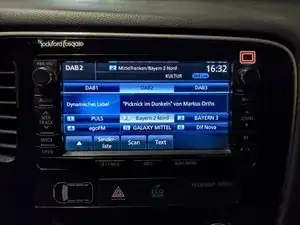
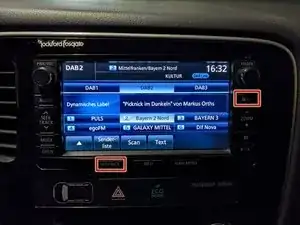
    • Die Versionsnummer deines MMCS findest du in der oberen rechten Ecke des Geräts.

    • In diesem Fall haben wir die Versionsnummer W-12.

    Hey @sedorr . Not sure if you are polish, german.... so ill ask in english :) I tried few times to flash sd card, but my car doesnt read the maps at all :/ I used Balena.... all was flashed correctly and still not working, any ideas what could be an issue ? i got 16GB card

    sakeeeeee -

    I’m not entirely sure, since the car can be pretty picky. A lot more people seem to have trouble with the ISOs compared to the WinHex images. I’ve had issues with certain SD cards—especially some from Swissbit—that the car simply wouldn’t accept, even though others worked fine. Have you tried manually copying the files from the ISO? Just format the SD card to exFAT with 512 bytes per sector and copy all the files over. Also, check if the files inside the ISO look normal—if the folder and file names are a garbled mess, the ISO might be corrupted. If everything looks fine and it still doesn’t work, the issue is usually with the SD card itself.

    Sebastian -

  2. r6RRPqhUHoMg4Pek
    r6RRPqhUHoMg4Pek
    byS46eeZNxHxreXb
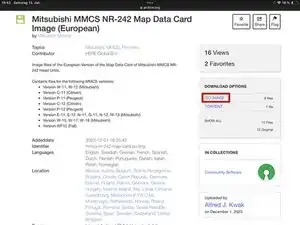
    • Du kannst die Bilddatei hier herunterladen: link

    • Klicke auf ISO IMAGE.

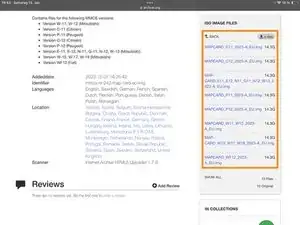
    • Lade die MAPCARD_####_2023-A_EU.img-Datei herunter, die die Versionsnummer deines Gerätes im Namen hat.

    • MMCS E-11 und E-12 sind analog zu W-13.

  3. ogeWdFOOQDXUnRPC
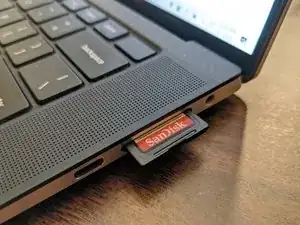
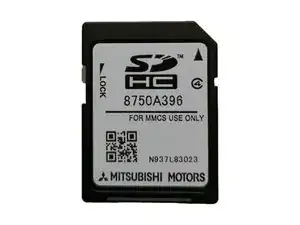
    • Die SD-Karte muss eine 16GB SDHC-Karte mit mindestens 15.718.400.000 Bytes und 30.700.000 logischen Sektoren sein.

    • Wenn die SD-Karte, die du hast, etwas zu klein ist, aber du eine größere zur Hand hast, kannst du auch einfach auf die größere Karte flashen, die kleinere Karte im exFAT-Format mit 512 Byte/Sektor formatieren und alle Dateien von der größeren Karte darauf kopieren. Dies kann zu ein paar Instabilitäten führen, funktioniert aber trotzdem.

    • Stecke die SD-Karte in deinen PC.

  4. WLMwWcVoyKjd3ell
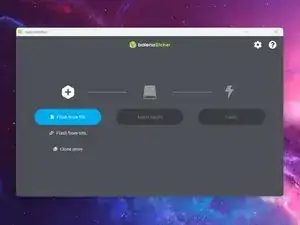
    • Starte balenaEtcher.

    • Da wir eine Standard-.img-Datei verwenden, kannst du auch jedes beliebige andere Programm verwenden, das Image-Dateien flashen kann. In dieser Anleitung wird jedoch nur der Vorgang mit Balena Etcher behandelt.

  5. hqDHROqKoF43NpMU
    hqDHROqKoF43NpMU
    XDZkVqTqsRKnLAaN
    yiatYVOtrOatAoMO
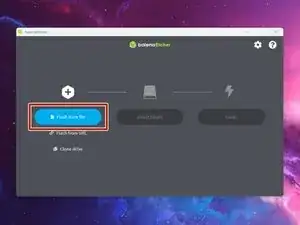
    • Klicke auf den Flash from file-Button.

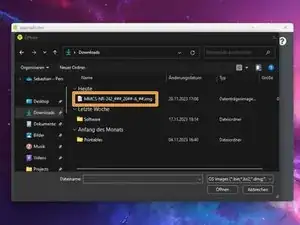
    • Wähle die Datei, die wir im 2. Schritt heruntergeladen haben, aus.

  6. 62nFFb4TuNEa4o3q
    62nFFb4TuNEa4o3q
    K4MbCEwggsUXSUFV
    ZHM2SP1ktBkrxGkV
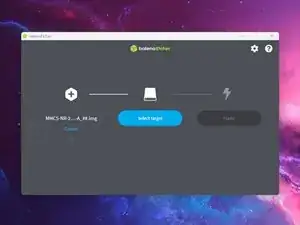
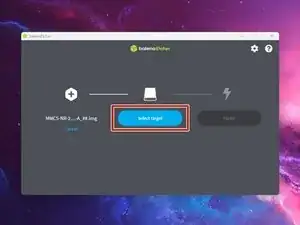
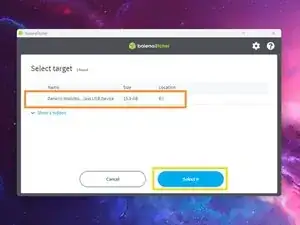
    • Klicke auf den Select target-Button.

    • Wähle die SD-Karte aus, die du verwenden willst.

    • Klicke auf den Select-Button.

  7. 3ZMaHOT6LfIxwTgD
    3ZMaHOT6LfIxwTgD
    5kKkOfnLGfj1yu32
    bqCGZnHB5ZS1NZ6B
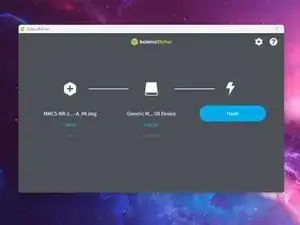
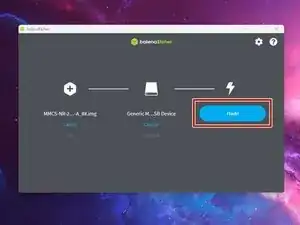
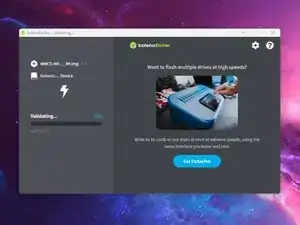
    • Klicke auf den Flash!-Button.

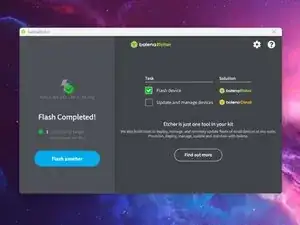
    • Warte, bis das Programm mit dem Beschreiben der Karte fertig ist.

    • Entferne die SD-Karte aus dem Computer, sobald der Vorgang abgeschlossen ist.

  8. OTkrXvZU55KJGVN4
    OTkrXvZU55KJGVN4
    6grtIiFMJJJo2OKs
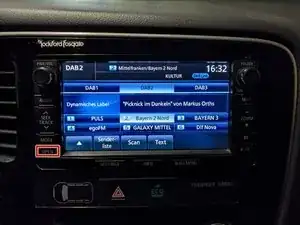
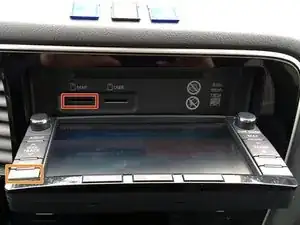
    • Drücke die OPEN-Taste.

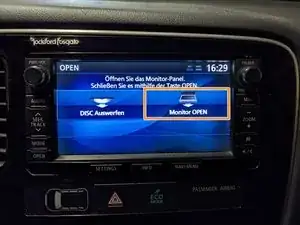
    • Drücke die Monitor OPEN-Taste auf dem Display.

  9. jujFx2muE1wYaKLi
    jujFx2muE1wYaKLi
    yCReXxWYPq4YEVl3
    • Tausche die SD-Karte gegen die bereits im MAP-Slot installierte aus.

    • Schließe das Display durch erneutes Drücken der OPEN-Taste.

    • Wenn das Auto die SD-Karte akzeptiert, wird sie nun dauerhaft mit dem MMCS gekoppelt sein und nicht mehr mit anderen Autos funktionieren oder auf einem Computer angezeigt werden.

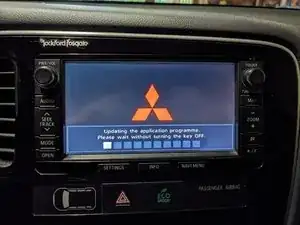
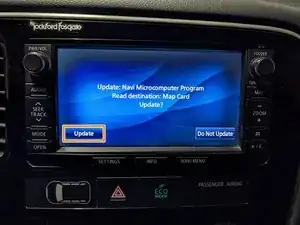
    • Falls die Firmware auf der SD-Karte neuer ist als die bereits installierte Version, wird das Gerät fragen, ob du aktualisieren möchtest. Drücke auf dem Bildschirm die Update-Schaltfläche, um fortzufahren.

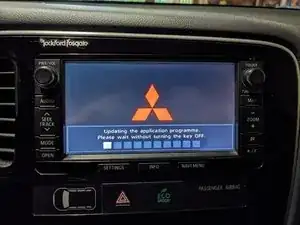
    • Wenn du bereits die neueste Firmware-Version hast, wird das Auto normalerweise nach dem Neustart nur eine kurze Update-Sequenz durchführen.

    • Schalte die Zündung nicht aus, während das Update läuft!

    Hello! Well (I think) the car doesn't even read that I have put the new SD card in. What do I do? :)

    Renārs Ruža -

    my car*

    not the car...

    Renārs Ruža -

    It just say "Map data can not be read" or something along those lines... XD

    Renārs Ruža -

    You could try a different SD card (there are some cards that just don't work for some reason), manually format the card to exfat and copy the files from the iso (in case the flashing went wrong in some way), or both.

    Sebastian -

    • Falls du von der russischen auf die europäische Benutzeroberfläche oder umgekehrt wechselst, könnte das Gerät dir melden, dass es die Kartendaten nicht lesen kann. Die folgenden Schritte gelten nur, wenn du auf dieses Problem stößt.

  10. qTUwDLD6AkrbWAan
    qTUwDLD6AkrbWAan
    5nvCVASlO3FMbWew
    eRlRZAVf32wi1UIr
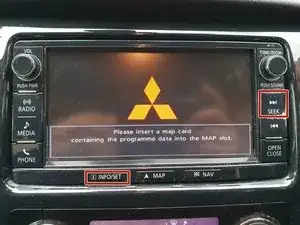
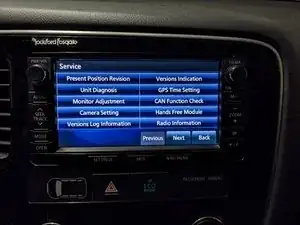
    • Rufe das Servicemenü auf, indem du die Tasten SETTINGS und MAP (für W-16 und W-17 INFO/SET und SEEK) 4 Sekunden lang gedrückt hältst.

  11. KVrNPN3IURcPeKBH
    KVrNPN3IURcPeKBH
    ndE36jtJqX1fX2G5
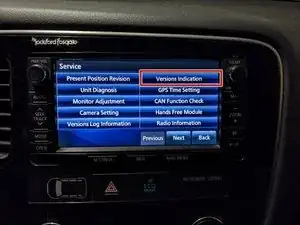
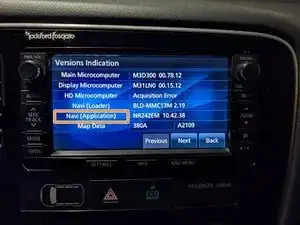
    • Navigiere zu Versions Indication.

    • Halte Navi (Application) 4 Sekunden lang gedrückt.

  12. sL5KWvWsmkS1Iqn3
    sL5KWvWsmkS1Iqn3
    nW2ddDRfKEAjhCcB
    KXiuMYVCC5uhGSyb
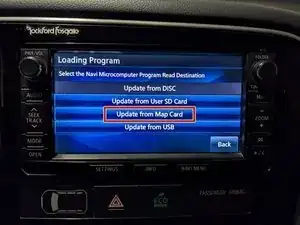
    • Drücke Update from Map Card.

    • Bestätige, indem du auf Update klickst.

    • Das Gerät wird nun den Aktualisierungsprozess starten. Im Verlauf dieses Prozesses wird es zweimal neu starten und sich auf Werkseinstellungen zurücksetzen.

    • Schalte das Auto nicht aus, während das Update läuft!

    Cant get this to work. The download takes very long time. it has gone wrong two times, and i get an error on damage image file when it is finished. the Etcher also fails while trying to flash the SD card. Is there an alternate download for the w12 file. or is there anything else i can try?

    andreas@hm-kontor.no -

    You could try the alternative method from this guide. If you can still open the corrupted ISO on your PC you can also just copy and paste the files to a 16gb SD card you formatted to exfat.

    Sebastian -

Abschluss

Bewahre die alte SD-Karte als Backup auf, falls mit der neuen Karte jemals etwas schief geht. Es ist immer gut, eine Sicherungskopie zu haben.

Sebastian

Mitglied seit: 19/08/18

32430 Reputation

15 Kommentare

Bei mir klappt es leider nicht.

Haber ein W15 Modell, habe das ISO Image auf eine Micro SD + SD Adapter geflasht.

Beim Einlegen erscheint die Meldung "Speicherkrte kann nicht gelesen werden. Überprüfen sie die Karte".

Habe bereits mit FAT32, NTFS, extFat formartiert.

Was mache ich falsch?

Da Dre -

Das ist schwer zu sagen, das Gerät kann etwas wählerisch mit Karten und USB Sticks sein... Hast du schon Mal versucht eine Karte auf exfat zu formatieren und die Dateien aus der ISO Datei zu Copy Pasten? Ansonsten könntest du auch Mal den "alten" Prozess mit Winhex ausprobieren, Winhex ist allerdings keine Freeware.

Alfred Kwak -

Danke für die schnelle Antwort.

Ich habe schon eine andere Speicherkarte probiert...auch formatiert mit extFat.

Mit Winhex bin ich leider auch gescheitert, nachdem ich die Map Datei geschrieben habe, müssen die Systemdaten geschrieben werden.

Hier kommt aber die Meldung, dass diese nicht geschrieben werden kann da Fehler auf der Speicherkarte erkannt worden sind.

Da Dre -

Hast du es mal mit einer neuen Karte von einem anderen Hersteller versucht? Nicht alle 16gb Karten sind gleich. Manche sind minimal kleiner als andere, was zu Problemen führen kann. SanDisk Karten z.B. funktionieren meistens sehr gut. SwissBit Karten sollten auch funktionieren, aber ich hab sie noch nicht im Auto getestet. Hama Karten sind zu klein, man kann sie aber auf exfat formatieren und die Dateien manuell aus der ISO Datei rüberkopieren.

Alfred Kwak -

Ich gebe auf....habe es nun noch mit einer neuen SD Karte probiert. Auch hier der beschriebene Fehler.

Hab auch probiert die ISO zu mappen und die Daten manuell auf die Speicherkarte zu kopieren.

Da Dre -

is there maps for North America ?

MindBlow -

The archive does not work as it's not opening, I cannot download the maps and system update

Gagandeep Singh Monga -

I am trying to update the maps and the system for Outlander phev 2015 model

Gagandeep Singh Monga -

I've got a W-15 and gave it a try, although the extremely slow download fork server, it took me over 2 days to download those 14gig file with maps, then put it on samsung SD card, and my outlander shown unknown Mal SD card. Waste of time guys.

John Doe -

Bonjour, ça ne fonctionne pas du tout votre tutoriel !!! j'y ai passé 2 jours, j'ai essayé de plusieurs façons... mais rien ne fonctionne !!! Grosse perte de temps !!!!!!!!!!

doso35 -

I bougt a brand new SanDisk 16GB SDHC card, still no luck. The car won't read the card. You had one job, Mitsubishi...

John Wassberg -

I just tried it and it didn't work. Tried through balenaEtcher and no luck. I also tried to copy it directly from the img file on to the memorycard with no luck. The system only displays that the map cannot be read. Tried different memory cards aswell. Samsung, Sandisk, Kingston, 16gb, 32gb. None of them are working. Any ideas?

Harald Agasøster -

where is the activation key for the mmcs map update for W12?

Teslamrevo6 -

I would like to know this too. (W15)

Tóth Albert -

Thanks again for the guides Sebastian! Could not get the Balenaetcher card to work no matter how I formatted or the size of the card. Purchased new 16gd Sandisk, allocated "ALL" volume and formated to exfat . Then found "free" version of winhex on TPB, Followed guide and voila SW version CI, map 2024A (From SW P, map 2013-B). My car have some russian letters on windows so it might have been imported from there. That would also explain why winhex method worked?

Now only find Hands free firmware that will give my phone full access. Have Hand free module sw 19.00 and thats probably the latest for W-12.

Timmey78 -