Einleitung

Mitsubishi MMCS NR-242 ist ein beliebtes Auto-Navigations- und Multimediasystem, das es Autofahrern ermöglicht, sich auf unbekannten Straßen zurechtzufinden, Musik zu hören und während der Fahrt Anrufe zu tätigen. Ein wichtiger Aspekt der Wartung dieses Systems besteht darin, die Firmware zu aktualisieren, um einen reibungslosen und effizienten Betrieb sicherzustellen. Durch das Aktualisieren der Firmware Ihres MMCS NR-242 kann man die Leistung verbessern, neue Funktionen hinzufügen und Fehler oder Sicherheitsprobleme beheben. In dieser Anleitung führen wir dich durch die Schritte zur Aktualisierung der Firmware deines Mitsubishi MMCS NR-242, damit du dessen zahlreichen Vorteile auch weiterhin auf der Straße genießen kannst.

Hinweis : das Update für die Bluetooth Hands Free Module Firmware muss separat durchgeführt werden.

  1. Bpf22WwShjTF4AGx
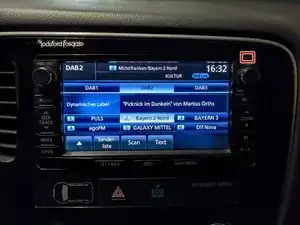
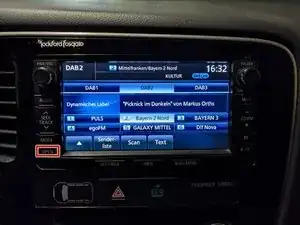
    • Die Versionsnummer deines MMCS findest du in der oberen rechten Ecke des Geräts.

    • In diesem Fall haben wir die Versionsnummer W-12.

  2. Bglj45WCaLbuI1Ec
    Bglj45WCaLbuI1Ec
    BrM2dkOVuClNwCSO
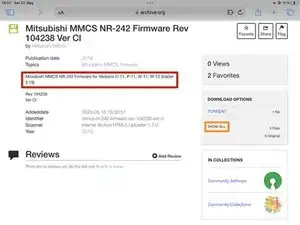
    • Du kannst die Firmware-Dateien hier herunterladen: Version CR, CZ und CI.

    • Überprüfe, ob die Firmware-Version mit deinem gerät Gerät funktioniert.

    • MMCS E-11 und E-12 sind Analoga zu W-13.

    • Lade die Firmware für dein Gerät herunter.

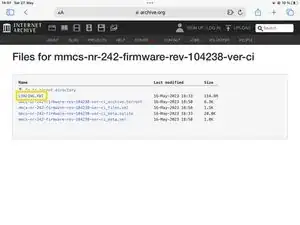
    • Klicke auf SHOW ALL.

    • Lade LOADING.KWI herunter.

    Doesn’t work webpage doesn’t come up

    Erol Emin -

    The link should just open in a new tab. I just checked, the website on the other end isn't broken. Maybe try opening the links through the right click menu.

    Sebastian -

    I can download now. Can I install this software to firmware E-11.

    Thanks

    Erol Emin -

    Buenas tardes,

    que diferencia hay entre Versión CR , CZ y CI .

    Gracias

    Luismi mg -

    Different Versions are compatible with different devices. Which Software version you need will depend on the device version you have.

    Sebastian -

    muchas gracias!!!

    Luismi mg -

    my version is a W-15.

    I need to install the next firmware: MMCS_W15_W17_firmware_rev_506372_ver_CR

    Is correct?

    thanks!!

    Luismi mg -

    Yes, that is correct. You need version CR.

    Sebastian -

    I have a question on this I have a N-11 which CZ is the firmware compatible with it I currently am on firmware AF is this all across regions or is this only for overseas vehicles I'm in the USA

    MR214 -

    Yes, it's compatible.

    Sebastian -

    Hi Sebastian! Thank you for awesome work. I have the w12 with sw version p in it. I cant recall it ever been updated but im asked if i want to downgrade to this version. Is the unit just confused?

    Timmey78 -

    Hi @timmey78 , CI is just the newest one available as an update package, not the newest one that was ever shipped. What does it tell you your current version is? If it is higher than 10.42.38, then you already have a newer version and shouldn't need to do anything.

    Sebastian -

    Version number on unit was higer yes. Will try to update the map. Perhaps newer firmware was included there:)

    Thank you again

    Timmey78 -

  3. 33bBoVXPvnpGNuHY
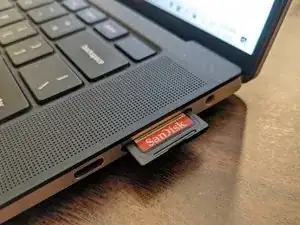
    • Die SD-Karte muss auf FAT32 formatiert sein. Wenn die noch nicht auf FAT32 formatiert ist und du nicht weißt wie das geht, wird es dir in dieser Anleitung erklärt.

    • Kopiere die LOADING.KWI-Datei in das Stammverzeichnis der SD-Karte.

  4. IPpK1ThDKuUUqmki
    IPpK1ThDKuUUqmki
    RAnsAbR1xJiTbJF6
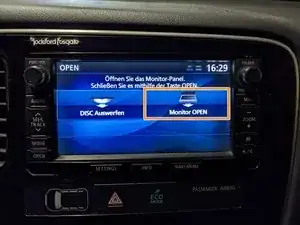
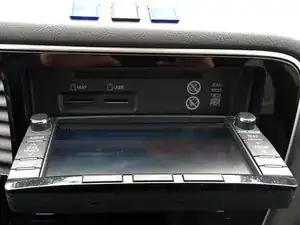
    • Drücke die OPEN-Taste.

    • Drücke die Monitor OPEN-Taste auf dem Display.

  5. F5STj3e1x4TRJQ6u
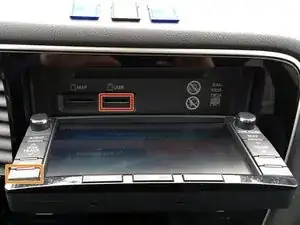
    • Stecke die SD-Karte in den USER-Slot.

    • Schließe das Display durch erneutes Drücken der OPEN-Taste.

  6. yp1yyuN4iLPNxV6A
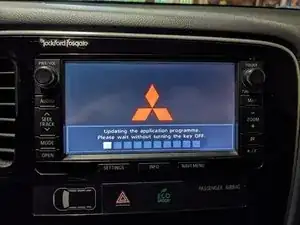
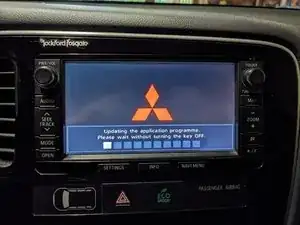
    • Das Gerät erkennt die Firmware-Datei automatisch und fragt, ob du das Update durchführen willst.

    • Drücke auf den Update-Button auf dem Bildschirm, um fortzufahren.

    • Schalte das Auto nicht aus, während das Update läuft!

    The system recognises The update. I press The update button, but after it says : The sd card cannot be read. Doesn't make a lot of sense, since it recognises it, so why wouldn't it read it and update it? Any ideas?

    Mitsubishi ASX 2013, Navi Version W-12

    Anton Martin -

    Besides restarting the car and trying again my only guess would be that maybe trying a different (16gb or less) SD card could help. It can be a bit picky with USB flash drives, it might also be picky with SD cards, though I never encountered that problem myself. What kind of card are you using?

    If it still doesn't work you can also update from USB or CD. Just follow this guide starting at Step 11.

    Sebastian -

    Hello from Greece, mine w-12 (2013 Mitsubishi ASX)says that I am trying to downgrade my firmware (my mmcs have 00107150) .Is that correct or I have to ignore it and proceed to installation. Thanks in advance.

    George -

    If it you already have a newer version installed, then you don't have to update your device.

    Sebastian -

    Thanks for your fast answer Sebastian, but its 2013 car model and i dont think that someone else update my firmware. I can read here that this Ver is 00104238 ******from 2019. thanks again

    George -

    Then you can just proceed. Maybe it's just a bug.

    Sebastian -

    Maybe I'll try it , I am not sure yet. What is your suggestion? If I try it I'll inform you. Thanks.

    George -

    Hello. I try different sd cards ,many ways to format fat32 and the procedure stops after Step 5. Doesn't recognize the "Loading.KWI" and doesn't start the update 😞😞😞

    Γεωργια Ναννου -

    @georgianannou What kind of SD card are you using? The car only accepts SD or SDHC cards, meaning that the maximum capacity it recognises is 32gb, though it seems to work better with lower capacity cards, such as 4gb cards.

    Sebastian -

    I have tested 4-5 sd cards from 256 mb :-O to 16 gb , SD and SDHC .

    But i remember that some weeks ago , works and i didn't proceed because i thought that was downgrade, so i update only the map to 2023A.

    I dont give up, ill try again and ill inform you

    Thanks again for your time .

    George -

    @geoaek The map data card already includes the newest firmware, so you don't need to run a seperate update.

    Sebastian -

    oh ok , thats good news , thanks Sebastian , you are amazing !

    George -

    Hi , something happened while updating and it froze, had no choice but to switch system off and now it has bricked the software,
    Doesnt load into the software. Unit is still active, reverse camera comes on , and panel opens. Any suggestions on recovery would be appreciated. I tried the disconnect the battery over night trick with no luck. its a W-12 in Australia

    Barry -

    I don't know, I never came across something like that. Maybe have a dealership take a look at it.

    Sebastian -

    I've download for my phev's E-11 and start the update process. It's began to gray the squares under the text. After 2nd = 20%, the squares missed and the 2 text lines became grayed!

    Semms the update don't work!

    Now my MMCS is briked! :( :( :(

    Lyubomir Bakalov -

    Barry,

    The only way to recover after failed update is to prepare a new card with MAP and SYS.
    (look here: mmc-forum.ru/viewtopic.php?t=11&start=20)
    In READY mode open the MMCS and switch OFF.

    Remove the MAP card and put the new prepared.
    Switch ON to READY. Close the MMCS. Hold the NAVI & AUDIO for 5 sec.
    If the new prepared MAP card is OK, you will see the Mitsu logo and working MMCS.
    Enjoy!

    Lyubomir Bakalov -

    Thanks @sedorr , maybe any suggestions on how to cold reset or boot off the Sd Card ? Should I have the LOADING.KWI in the root of the SD in the User or Map slot ?

    Barry -

    You can install firmware on the device in four ways: using a CD, a USB drive, a User SD card, or a Map SD card. Map SD cards automatically install the firmware during boot if a change is detected, although yours might be corrupted after attempting an update. Try removing the map card, restarting the unit, and then reinserting the map card while it's on. Alternatively, you could create a new European map card and insert that. For the User SD and USB methods, place the loading.kwi file in the root directory and connect it to the car. Note that you may need to confirm a message for this to work. If you can access the service menu, you can also force an update by long-pressing the "Navi (Application)" segment of the "Versions Indication" menu.

    Sebastian -

    Other problem is I now also have a CD that was in the unit stuck as I cant access the eject ...

    Barry -

    Habe die SD-Karte in den Kartenslot (rechts) eingeführt und folgende Meldung erhalten:

    Navi-Programm gefunden in der Benutzer-SD Karte

    Aktuelle Version 00104255

    Gefundene Version 00104238

    Programm Aktualisieren?

    Heisst das nun, dass mein bereits vorhandenes Programm neuer oder älter ist?

    Stephan -

    Es kann sein dass du eine leicht neuere Software Version hast. Ich würde das Update in deinem Fall nicht machen.

    Sebastian -

    My radio says number n11. Is this update valid? my outlander is 2014

    JUAN ANTONIO GONZALEZ GARCIA -

    Yes, you'd need version CZ.

    Sebastian -

    If nothing happens, do you think its an SD card issue or would it be that if its already updated, nothing should happen?

    Tom Cameron -

  7. fBTqvTXNQHLnyQIL
    • Wenn das Update beendet ist, entferne die SD-Karte, indem du die Schritte 4 und 5 wiederholst.

Abschluss

Fahr vorsichtig!

Sebastian

Mitglied seit: 19/08/18

32430 Reputation

5 Kommentare

Un saludo Sebastián, José María de Cádiz, quiero actualizar los mapas de mi Mitsubishi Outlander 2017, mi equipo W-15, al entrar al enlace que pones como hacerlo, me sale que está desconectado temporalmente , otro enlace para poder descargar mapas y archivos del Sistema, para actualizarlo?...gracias

Jose Maria CHG -

Hola José María, lamentablemente el archivo en Internet Archive en mantenimiento durante los próximos días debido a una reciente violación de datos. Los archivos que buscas también están disponibles en una página rusa llamada MMC Manuals, pero te recomendaría esperar hasta que el Internet Archive línea vuelva a estar disponible para una descarga más segura.

Sebastian -

Do you know if this version (W12 10.42.38) is the latest versions? I have 10.71.50 and it asks me if I want to downgrade if I try to install this version. Is that correct?

Dunk -

How can I remove PIN in my car radio?

SAID -

can i add a wireless android auto or apple car play to this unit

BigGeorgeAUS -